
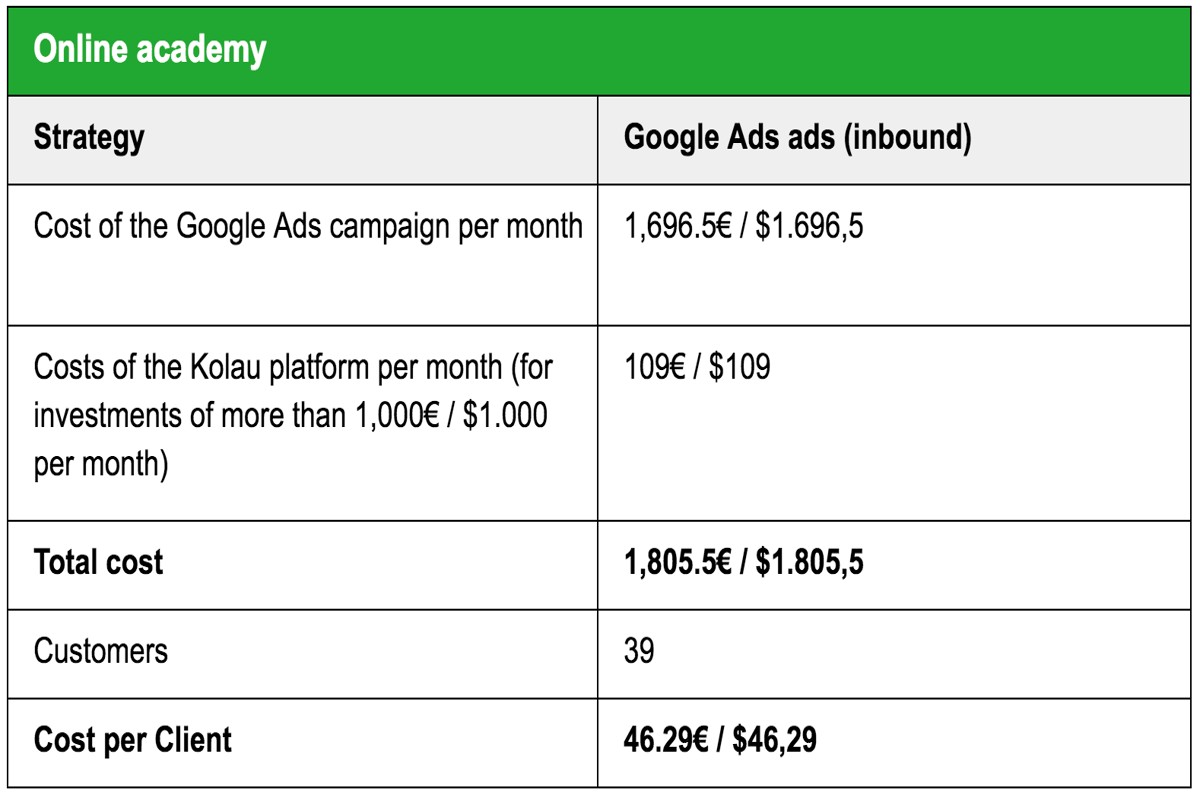
How much to advertise on Google Ads depends on your budget and specific marketing goals. Businesses typically spend between $1 to $2 per click, although this can vary significantly based on industry competition and the targeted audience. Understanding these costs is crucial for maximizing return on investment (ROI) and achieving effective online visibility.
Determining how much to advertise on Google Ads is essential for businesses aiming to enhance their online presence and drive traffic. With over 3.5 billion searches conducted daily, effectively managing advertising budgets can significantly impact market share and customer acquisition. Companies that fail to navigate these costs may struggle to compete in an increasingly digital landscape, where every click counts.
Misunderstanding the costs associated with Google Ads can lead to substantial financial losses, wasted advertising spend, and missed opportunities for growth. Without a clear strategy, businesses risk falling behind competitors who effectively leverage their advertising budgets to capture consumer attention.
This article provides a comprehensive guide on how much to advertise on Google Ads, including a comparison of top providers, detailed cost breakdowns, best practices for optimizing ad spend, and insights into local SEO strategies that can enhance your advertising effectiveness.
What is the average cost per click on Google Ads?
The average cost per click (CPC) on Google Ads usually falls between $1 to $2 for search ads across different industries. However, in highly competitive fields, such as finance or legal services, CPC can surpass $50. These numbers show how costs can differ quite a bit based on various factors.
Several elements impact the cost of advertising on Google Ads. First, the industry is crucial; more competitive sectors generally face higher CPC due to aggressive bidding on keywords. Plus, the quality score of your ads — which Google uses to evaluate relevance and performance — can also affect costs. Higher-quality ads can lead to lower CPCs because Google rewards those that offer a better user experience (this is often overlooked).
- Keyword competitiveness: Some keywords are more contested, driving up their costs.
- Geographic targeting: Advertising in high-demand regions or large urban areas often incurs steeper costs.
- Ad placement: Ads that appear at the top of search results typically have a higher CPC than those in lower positions.
Understanding these factors is essential for effectively budgeting your advertising spend. Businesses should examine their industry benchmarks to establish realistic CPC expectations. To aid in estimating costs based on selected keywords and target demographics, use tools like the Google Ads Keyword Planner.
Expert insight: Concentrate on boosting your quality score through relevant ad copy and optimized landing pages. This approach can substantially lower your CPC while improving overall campaign performance.
How do I determine my Google Ads budget?
Determining a Google Ads budget requires evaluating several factors, including business goals, target audience, and industry benchmarks. A common approach is to set aside about 5-10% of overall revenue for advertising. However, in competitive sectors, this percentage often needs to rise to gain the visibility you want.
To establish a suitable budget, follow these steps:
- Define your advertising goals. Identify what you want to achieve, such as increasing sales, generating leads, or building brand awareness. Clear goals are essential for estimating the budget necessary to meet those specific outcomes.
- Analyze your target audience. Understand your intended audience and the competitiveness of the keywords for that group. Tools like Google Keyword Planner can offer insights into average costs per click (CPC) and competition levels — this is often overlooked.
- Evaluate industry benchmarks. Research what others in your industry typically spend. For instance, industries like finance and insurance usually require higher budgets due to increased competition, with average CPCs ranging from $3 to $6.
- Calculate your maximum cost per acquisition (CPA). Figure out how much you can afford to spend to acquire a customer based on your profit margins. This number will guide your budget decisions for campaigns.
- Test and adjust. Start with a monthly budget that matches your goals, and make adjustments based on performance. Keep an eye on key metrics like click-through rates (CTR) and conversion rates — it’s crucial to refine your spending.
Expert insight: Regularly review budget allocation and performance metrics. Flexibility in adjusting your budget as market conditions shift can greatly enhance advertising effectiveness and ROI.
What factors affect Google Ads pricing?
Google Ads pricing relies on several key factors, such as competition, keyword selection, and ad quality. Costs can vary widely — from $1 to over $50 per click — depending on these variables.
The first major factor is **competition**. In sectors with high competition, advertisers pile on their bids for the same keywords, driving up prices. For example, the finance and insurance sectors often incur much higher costs per click compared to niche markets. This intense competition breeds a **bidding war**, where businesses up their bids to secure ad placements, leading to inflated costs.
Another critical factor is the **keywords** selected for campaigns. High-demand keywords usually carry a higher price tag. For instance, keywords related to “personal loans” can be far more costly than those about “gardening tips.” Advertisers need to strike a balance — between high-volume, high-cost keywords and more budget-friendly, lower-competition options — to stretch their budget effectively.
Finally, the **quality of the ad** itself significantly influences the cost. Google employs a metric called **Quality Score**, which evaluates the relevance and performance of ads. A higher Quality Score often results in lower costs per click. Google rewards effective ads with better placements and reduced prices. So, optimizing ad copy, landing pages, and overall user experience is crucial for cost reduction.
Expert insight: To manage Google Ads costs effectively, concentrate on improving Quality Score by enhancing ad relevance and user engagement. This can lead to lower CPCs and better ad positioning — ultimately maximizing your advertising budget.
How much should a small business spend on Google Ads?
Small businesses should typically set aside between $1,000 and $10,000 each month for Google Ads, with the exact amount depending on specific goals and how competitive the industry is. A common rule of thumb is to allocate 5-10% of gross revenue to digital marketing, which includes Google Ads.
Budgeting for Google Ads requires a strategic approach based on business objectives, target audience, and market dynamics. First, a small business must clarify its goals — whether that’s generating leads, boosting brand awareness, or driving sales. This clarity helps in pinpointing the right budget. For instance, a business concentrating on lead generation may need to invest more upfront to gather the necessary data and optimize campaigns effectively.
- Assess your industry competition: It’s crucial to research the average cost-per-click (CPC) in your sector. Highly competitive industries might see CPCs ranging from $2 to $6 or more — a larger budget is often necessary to secure visibility.
- Use data-driven decisions: Start with a modest budget to experiment with various ad formats and keywords. Then, analyze performance metrics like click-through rates and conversion rates to adjust spending accordingly (this is often overlooked).
- Consider your sales cycle: Businesses facing longer sales cycles may require a bigger investment in Google Ads to nurture leads through retargeting and ongoing campaigns. This ensures visibility throughout the customer journey.
- Monitor and adjust: Regularly review campaign performance and be ready to reallocate funds. If certain ads or keywords show exceptional performance, it may be wise to increase their budget to maximize returns.
Expert insight: A/B testing different ad copies and targeting options can reveal insights that significantly enhance ROI. This allows for more efficient budget allocation over time.
Is google ads worth the investment?
Yes, Google Ads can be a worthwhile investment for many businesses. Reports show that the average return on investment (ROI) for Google Ads is around 200%. This means for every dollar spent, businesses can expect to earn two back. However, effectiveness varies widely based on industry, campaign management, and target audience.
Several factors influence the value of investing in google ads. First, industry matters significantly; competitive sectors such as finance or e-commerce can yield higher returns due to stronger consumer interest. Also, well-structured campaigns that use targeted keywords and compelling ad copy typically perform better. For instance, businesses optimizing their ads for local searches often see improved ROI — they reach consumers actively seeking services nearby.
Another critical element is tracking and analyzing campaign performance. Using tools like Google Analytics helps businesses understand which ads convert best, enabling adjustments to budgets accordingly. There are many success stories; for example, a small retail business boosted its online sales by 150% within six months of launching a targeted Google Ads campaign. That shows the platform’s potential when executed strategically. On the other hand, businesses that neglect to monitor and adjust their ads may end up wasting resources on ineffective strategies.
Expert insight: Regularly reviewing and refining your Google Ads strategy can significantly enhance ROI. Investing in A/B testing for ad copy and landing pages is important to identify what resonates best with your audience (this is often overlooked). This approach can optimize spending and drive better results over time.
How long does it take to see results from Google Ads?
Typically, advertisers can expect initial results from Google Ads within 1 to 3 weeks after launching a campaign. However, to reach optimal performance may take anywhere from 3 to 6 months — this depends on several factors.
Several factors influence the timeline for seeing results from Google Ads. First, the type of campaign plays a significant role. For instance, search campaigns often yield quicker results. Display campaigns, on the other hand, usually require more time for brand awareness to convert into actual results. Additionally, the industry and competition level can affect how soon results appear; highly competitive sectors often take longer to establish a foothold in search rankings (this is often overlooked).
Another critical factor is the budget allocated to the campaign. A higher budget allows for more extensive testing and optimization, which can lead to quicker insights and adjustments. Furthermore, the quality of the ads and landing pages significantly impacts performance. Well-optimized ads typically result in higher click-through rates (CTR) — and better conversion rates accelerate the timeline for results. Lastly, ongoing management and optimization of the campaign can enhance performance over time, but it might take a few weeks to determine which strategies work best.
Expert insight: Regularly reviewing campaign performance data and making data-driven adjustments can significantly reduce the time needed to achieve desired results. Aim for iterative improvements based on analytics within the first few weeks of the campaign.
What are the best practices for advertising on Google Ads?
To maximize the effectiveness of Google Ads, implementing strategies that enhance targeting, ad quality, and budget management is essential. Effective campaigns can yield a return on investment (ROI) of up to 200% when optimized correctly.
Successful Google Ads campaigns depend on a mix of well-defined targeting, compelling ad copy, and continuous performance analysis. Ad targeting must zero in on specific demographics, locations, and relevant keywords. Use Google’s audience targeting features — like Remarketing and In-Market audiences — to reach users more likely to convert. This approach can significantly improve click-through rates (CTR) and conversion rates.
- Conduct thorough keyword research: Use tools like Google Keyword Planner to identify high-volume, low-competition keywords. Focus on long-tail keywords that closely align with your offerings; they often lead to higher conversion rates.
- Create compelling ad copy: Write clear, concise, and engaging ad text that highlights unique selling propositions (USPs). Include strong calls to action (CTAs) to encourage clicks, such as “Buy Now” or “Get a Free Quote.” (This is often overlooked.)
- Implement A/B testing: Regularly test different ad variations to determine which performs best. Experiment with headlines, descriptions, and landing pages to continually optimize ad performance.
- Monitor and adjust bids: Use bid strategies like Target CPA or Maximize Conversions to adjust bids based on conversion data. Regularly review performance metrics and adjust budgets accordingly. Confirm optimal spending through these adjustments.
- Utilize negative keywords: Regularly update your negative keyword list to exclude irrelevant search terms. This helps filter out unqualified traffic and improve overall ad performance.
Expert insight: Consistently analyze your campaign performance using Google Ads reports and Google Analytics. Data-driven decisions — like adjusting bids based on time of day or geographic performance — can lead to significant cost savings and improved ROI.
Can I set a daily budget for Google Ads?
Yes, you can set a daily budget for Google Ads. This feature helps control how much gets spent on advertising each day. The budget can range from as little as $1 to several thousand dollars — it all depends on your campaign goals and financial capacity.
A daily budget is essential in Google Ads. It sets the maximum amount you’re willing to spend on ads in a single day. Google Ads optimizes ad delivery based on this budget, distributing your spending throughout the day to maximize exposure. If your daily budget runs out, your ads may stop showing until the next day. This flexibility helps advertisers scale spending based on performance and market conditions.
- Daily Budget Limit: You can set a minimum daily budget of $1. Still, it’s advisable to choose a budget that aligns with your overall marketing strategy.
- Monthly Spending Cap: Google Ads also allows for a monthly budget cap. This is calculated by multiplying your daily budget by the average number of days in a month (approximately 30.4).
- Flexible Adjustment: Daily budgets can be adjusted anytime. This enables advertisers to respond quickly to changing market conditions or campaign performance metrics.
Many advertisers use daily budgets to test different campaigns or keywords. By analyzing performance within a set budget, businesses can make data-driven decisions about where to allocate resources for the best return on investment. Additionally, Google Ads leverages machine learning algorithms to optimize ad placements based on your budget, ensuring that your ads effectively reach the most relevant audience.
Expert insight: Regularly review and adjust your daily budget based on campaign performance. This will ensure optimal ad spend efficiency and maximize your advertising impact.
Understanding Google Ads Bidding Strategies
This section dives into the different bidding strategies available in Google Ads and how they directly affect advertising costs. Choosing the right strategy is crucial. It optimizes budget allocation and enhances campaign performance.
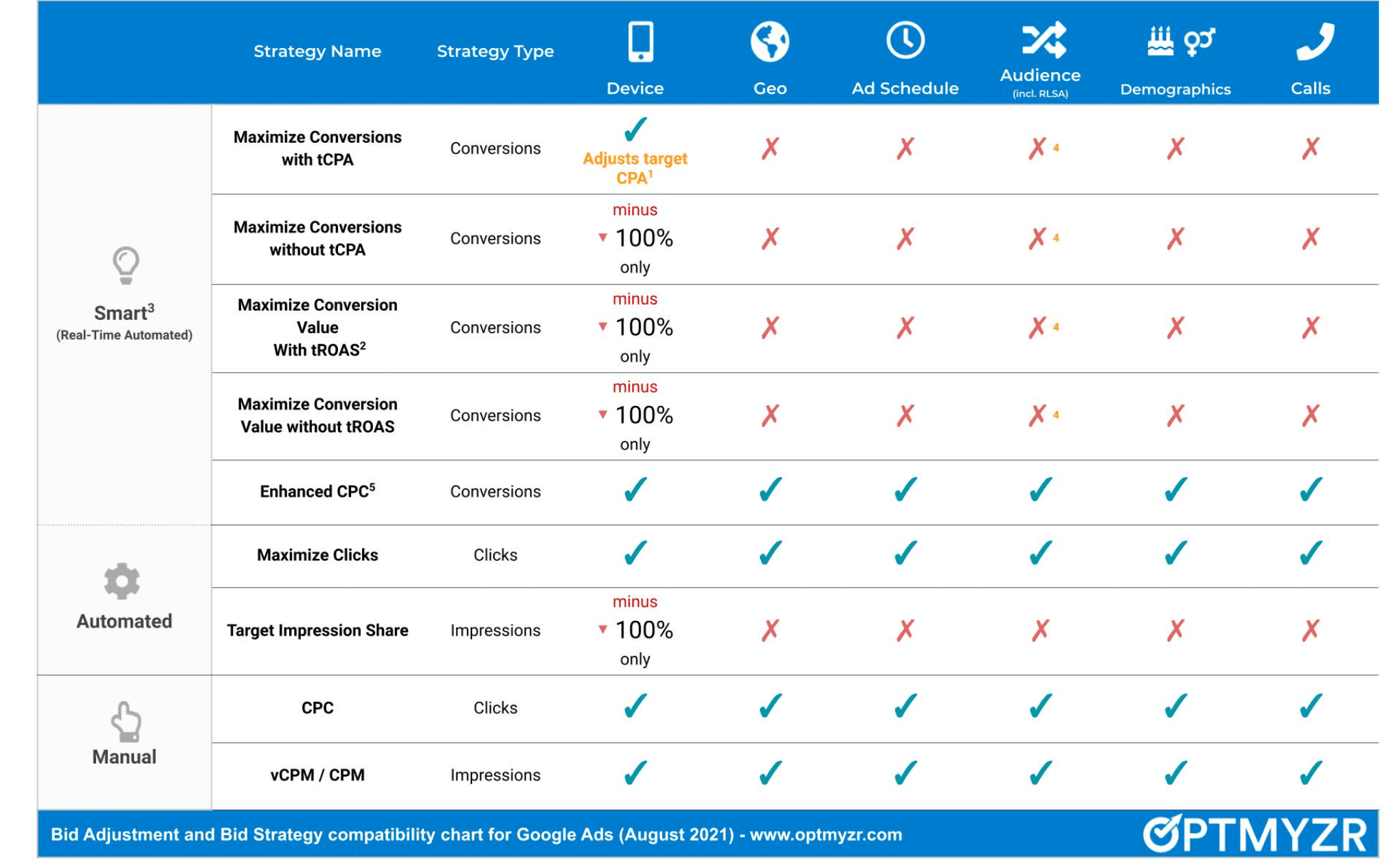
Manual vs. Automated Bidding
Google Ads presents two main bidding strategies: manual bidding and automated bidding. Manual bidding lets advertisers set their own bids for each ad group or keyword. This offers greater control over how individual campaigns perform. Adjustments can be made based on specific goals — like maximizing clicks or conversions.
On the other hand, automated bidding uses Google’s algorithms to optimize bids in real-time based on various factors. This includes competition and user behavior. This strategy can save time — and might improve campaign performance by leveraging machine learning to determine the most effective bid for each auction.
Choosing the Right Bidding Strategy
Choosing the right bidding strategy depends on campaign objectives, budget limitations, and the desired level of control. Key considerations include:
- Campaign Goals: Clarify whether the focus is on brand awareness, lead generation, or sales.
- Budget Flexibility: Check if the budget allows for manual adjustments or if automated strategies are more practical.
- Experience Level: Evaluate expertise in managing bids; manual strategies often require more knowledge and time.
For example, a business aiming for maximum visibility could gain from automated strategies like Maximize Clicks. In contrast, a company focused on cost-efficient conversions might prefer Target CPA (Cost Per Acquisition) bidding.
Impact of Bidding Strategies on Overall Costs
The selected bidding strategy plays a significant role in overall advertising costs. For instance, automated bidding strategies can lead to increased expenses during periods of high competition. The algorithm adjusts bids to keep ads visible. In 2024, businesses employing automated bidding noted an average increase of 15% in advertising spend compared to those utilizing manual strategies.
Meanwhile, manual bidding can allow for tighter control over spending, but it requires constant monitoring and adjustments to remain competitive. Advertisers must analyze historical performance data to anticipate how different strategies might impact costs.
Examples of Successful Bidding Strategies
Several businesses have effectively used tailored bidding strategies to meet their unique goals:
- Target ROAS (Return on Ad Spend): Online retailers commonly adopt this strategy to ensure the revenue from ad clicks exceeds their ad costs.
- Enhanced CPC (Cost Per Click): Companies seeking improved conversions can utilize Enhanced CPC, which adjusts manual bids based on conversion likelihood.
- Maximize Conversions: Non-profits often use this strategy to increase donations by optimizing for the highest number of conversions within a set budget.
Expert Insights
Common misconceptions about bidding strategies include the idea that automated bidding guarantees lower costs. While these strategies can improve performance, they don’t always provide the most cost-effective results — especially in competitive markets. Advertisers should stay alert and routinely review campaign performance metrics. Furthermore, the impact of ad quality and relevance is often overlooked (it’s worth double-checking), which can significantly influence bid effectiveness and overall costs.
Practical Application
To use this information effectively, advertisers should:
- Evaluate campaign objectives and decide on the desired level of control over bids.
- Experiment with various bidding strategies to find the one that best aligns with performance goals.
- Regularly assess campaign data to optimize bids and modify strategies as needed.
By grasping the nuances of Google Ads bidding strategies, advertisers can make informed choices about their advertising efforts on Google Ads. This ultimately maximizes their return on investment.
Maximizing Your Google Ads Budget
Managing a Google Ads budget effectively takes strategic planning and ongoing optimization. This section outlines essential tactics to make sure your advertising investment delivers maximum returns.
Setting Realistic Goals and KPIs
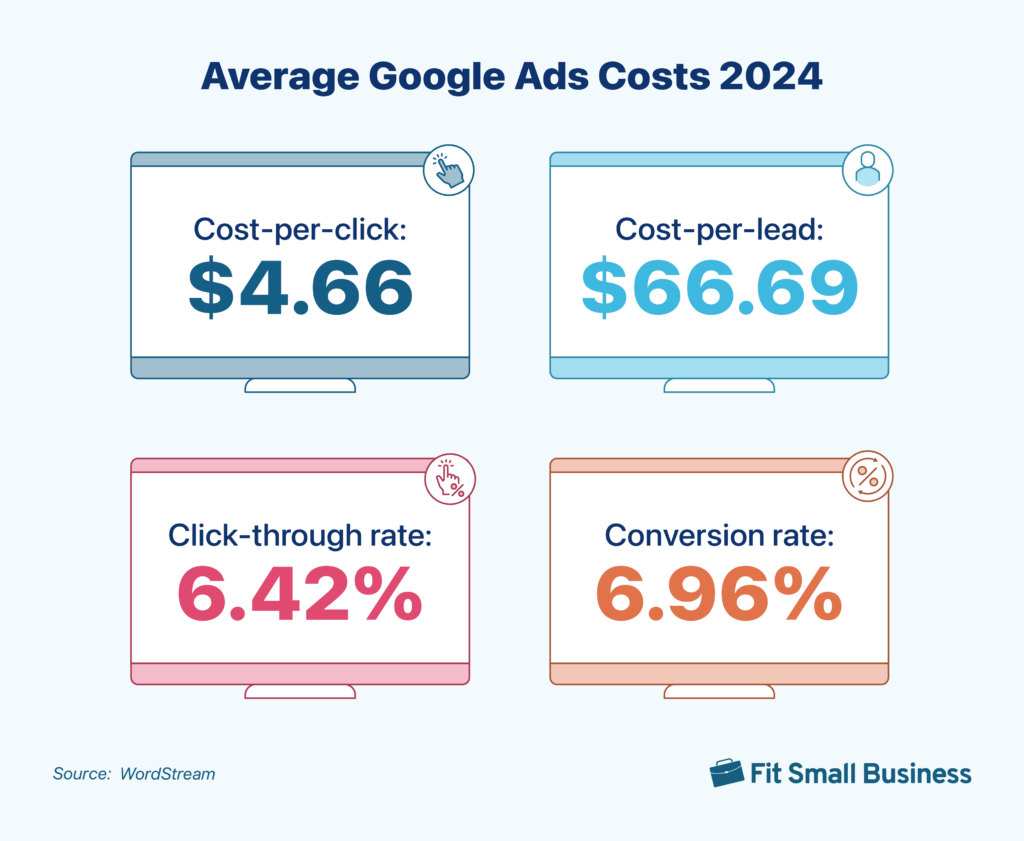
Establishing clear goals and key performance indicators (KPIs) is crucial to any successful advertising campaign. Goals should be specific, measurable, achievable, relevant, and time-bound (SMART). Common KPIs include click-through rates (CTR), conversion rates, and cost per acquisition (CPA). A 2024 survey found that businesses defining specific campaign goals reported a 30% higher ROI compared to those that didn’t.
Using Negative Keywords to Reduce Waste
Incorporating negative keywords into campaigns is an effective way to filter out irrelevant traffic. This practice minimizes wasted ad spend — and makes ads less likely to show up for searches that don’t align with your offerings. For instance, if premium products are what you sell, adding “cheap” as a negative keyword can hone your budget on more qualified leads. Regularly reviewing search term reports often uncovers additional chances to refine your keyword strategy (this is often overlooked).
Optimizing Ad Copy and Landing Pages
Compelling ad copy and optimized landing pages greatly impact conversion rates. Make sure your ad copy is clear, concise, and aligned with user intent. Highlight unique selling propositions (USPs) and include strong calls-to-action (CTAs). Moreover, landing pages should load quickly and provide a seamless user experience. A study from 2025 indicated optimized landing pages can boost conversion rates by up to 50%. It’s essential to invest time in this area.
Monitoring and Adjusting Campaigns Regularly
Continuous monitoring of campaigns allows for timely adjustments and improvements. Use Google Ads’ built-in analytics tools to track performance metrics. Set a regular schedule—at least bi-weekly—for reviewing campaign data. Look for trends, such as underperforming keywords or ads, and make informed adjustments based on those insights. A proactive approach can enhance performance. It also ensures budget is spent efficiently.
Nuance / Expert Layer
Many advertisers miss the impact of seasonality and market fluctuations on their campaigns. Understanding these dynamics can provide a competitive edge. For instance, a business may observe increased consumer interest during the holiday season — and should adjust bids and budgets accordingly. Additionally, misconceptions about the need for high bids to achieve visibility can lead to overspending. In reality, optimizing quality scores can often yield better placements at lower costs.
Practical Application
To apply these strategies effectively, start by defining your campaign objectives and KPIs. Conduct keyword research to establish both positive and negative keywords. Next, dedicate time to crafting engaging ad copy and optimizing landing pages for user experience. Finally, implement a routine for monitoring and adjusting campaigns based on data-driven insights. By following these steps, you can maximize the impact of your advertising budget and enhance the effectiveness of your Google Ads campaigns.
Common Mistakes to Avoid in Google Ads Advertising
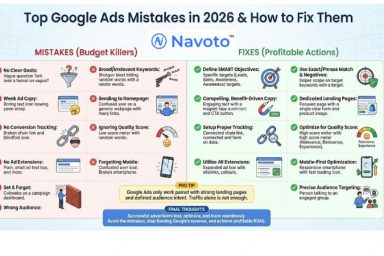
Effective Google Ads campaigns rest on strategic decision-making. This section highlights common mistakes that can waste budgets and harm performance. It also offers insights to improve advertising efforts.
Ignoring Keyword Research
Keyword research is the foundation of successful Google Ads campaigns. Yet, advertisers often overlook this crucial step. The result is often mismatched ads and unqualified traffic. In 2024, campaigns with well-researched keywords saw a 40% higher click-through rate (CTR) than those without. Use tools like Google Keyword Planner to find relevant keywords based on search volume and competition. Confirm that ads align with user intent.
Failing to Track Conversions
Conversion tracking is vital to understanding campaign effectiveness. Without it, advertisers can’t measure the return on investment (ROI) of their ad spend. Studies show that advertisers who implemented conversion tracking improved their campaign efficiency by up to 30%. Setting up conversion tracking requires defining what a conversion is—whether it’s a sale, lead, or another user action—and using Google Ads conversion tracking tools to monitor performance accurately.
Not Testing Ad Variations
Ad variations enable advertisers to optimize performance by determining which messages resonate best with target audiences. Many advertisers neglect A/B testing, leading to missed opportunities for improvement. According to recent data, campaigns that regularly test ad variations achieve 25% better performance metrics. Implement systematic A/B testing by creating multiple versions of ads with slight variations in headlines, descriptions, or calls to action—this helps identify the most effective combinations.
Overlooking Audience Targeting Options
Effective audience targeting boosts ad relevance and enhances conversion rates. Advertisers frequently fail to use advanced targeting features, such as demographics, interests, and remarketing lists. By 2026, advertisers using detailed audience targeting reported a 50% increase in conversion rates compared to those relying on broad targeting strategies. Use Google Ads’ audience targeting tools to refine reach—making sure ads are shown to users most likely to engage with your brand.
These common mistakes can seriously hinder campaign success. Yet, addressing them requires a commitment to ongoing improvement and strategy refinement. For instance, many advertisers mistakenly think that broad targeting will draw in higher traffic. Often, however, this leads to low-quality clicks and wasted spend. Instead, focus on tailored messaging and precise targeting to create genuine interest and engagement.
To enhance Google Ads performance, implement these actionable steps:
- Conduct thorough keyword research to inform ad copy and targeting.
- Set up conversion tracking to measure ROI effectively.
- Regularly A/B test ad variations to optimize performance.
- Utilize advanced audience targeting options to reach the most relevant users.
By avoiding these common pitfalls and taking a data-driven approach, advertisers can maximize their investment and achieve significant results in their Google Ads campaigns.
Case Studies: Successful Google Ads Campaigns
This section examines real-world examples of businesses that optimized their Google Ads budgets. Effective strategies from various industries are highlighted here. Analyzing these case studies often reveals actionable insights for future advertisers.

Industry-Specific Strategies
Different industries adopt distinct strategies for allocating budgets with Google Ads. Here are three notable examples:
- E-commerce: A fashion retailer allocated 30% of its annual marketing budget to Google Ads. The result? A remarkable 200% return on ad spend (ROAS) within six months. Key strategies included dynamic remarketing and optimizing product listings.
- Healthcare: A dental practice spent 25% of its marketing budget on targeted local ads, achieving a 50% increase in patient inquiries. The campaign zeroed in on local SEO, plus it included promotional offers to attract first-time patients (this is often overlooked).
- Technology: A SaaS company dedicated 40% of its budget to Google Ads, leading to a 70% jump in trial sign-ups. Targeted keywords and compelling ad copy tailored to specific user pain points proved crucial — outcomes like these are what make strategy so important.
Budget Allocation and Results
Effective budget allocation directly impacts campaign success. Businesses must consider factors such as audience targeting, keyword competitiveness, and seasonal trends. For instance, the fashion retailer’s investment in Google Ads was strategically timed around holiday shopping seasons, which certainly enhanced visibility and boosted sales.
Statistics from recent studies indicate that advertisers increasingly recognize the value of Google Ads, with spending projected to reach $200 billion by 2026. This trend underscores the importance of careful budget management and continuous optimization.
Lessons Learned from Successful Campaigns
Several key lessons emerge from the analyzed campaigns:
- Data-Driven Decisions: Successful advertisers leverage analytics to refine their strategies, adjusting bids and keywords based on performance metrics. This step is essential for staying competitive.
- A/B Testing: Testing different ad copies, landing pages, and bidding strategies allows businesses to identify what resonates best with their target audience.
- Responsive Ad Formats: Using responsive search ads maximizes reach and engagement. They adapt to user queries and improve click-through rates, which often translates to better results.
Key Takeaways for Future Advertisers
Future advertisers can draw several conclusions from these case studies:
1. **Set Clear Objectives:** Define what success looks like — increased sales, lead generation, or brand awareness, for example.
2. **Allocate Resources Wisely:** Invest in Google Ads based on historical performance data and industry benchmarks. This can lead to more effective campaigns.
3. **Continuously Optimize:** Regularly review and adjust campaigns to align with changing market dynamics and consumer behavior.
Nuanced Insights
Many articles on Google Ads budget allocation oversimplify the relationship between spending and results. One common misconception is that higher spending guarantees better performance. In reality, strategic targeting and ad relevance often yield better outcomes than sheer budget size. Businesses should focus on optimizing their campaigns instead of merely increasing their budgets. Additionally, understanding the role of ad rank, quality score, and bid strategy is essential for maximizing returns.
Practical Application
To implement these insights, advertisers should:
– Conduct a thorough analysis of past campaigns to identify effective strategies.
– Create a detailed budget plan, allocating funds based on performance metrics and industry benchmarks.
– Implement regular A/B testing to refine ad copy and targeting.
– Leverage analytics tools to monitor campaign performance and make data-driven adjustments.
By applying these strategies, businesses can enhance their Google Ads effectiveness. This approach will help optimize advertising budgets too.
Frequently Asked Questions
What is the average cost per click on Google Ads?
The average cost per click (CPC) on Google Ads typically ranges from $1 to $2, though it can vary significantly by industry and competition. High-demand keywords may cost more, while niche markets could be less expensive.
How do I determine my Google Ads budget?
To determine your Google Ads budget, consider your overall marketing goals, the cost per click in your industry, and your expected return on investment. Start with a daily budget that aligns with your financial resources and adjust based on performance.
What factors affect Google Ads pricing?
Google Ads pricing is influenced by factors such as keyword competition, ad quality score, and the bidding strategy you choose. Seasonal trends and geographic targeting can also impact costs significantly.
How much should a small business spend on Google Ads?
A small business should consider spending between $500 to $1,000 per month on Google Ads, depending on its industry and goals. This budget allows for testing and optimization of campaigns to maximize return on investment.
Is Google Ads worth the investment?
Google Ads can be worth the investment if managed effectively, as it offers targeted reach and measurable results. Businesses often see increased traffic and conversions when campaigns are optimized for their specific goals.
How long does it take to see results from Google Ads?
Results from Google Ads can typically be seen within a few days to weeks, depending on the campaign’s setup and budget. However, optimizing for better performance may take longer as data accumulates.
What are the best practices for advertising on Google Ads?
Best practices for Google Ads include conducting thorough keyword research, writing compelling ad copy, and regularly monitoring campaign performance. Continuous optimization and A/B testing are essential for improving results over time.
Can I set a daily budget for Google Ads?
Yes, Google Ads allows you to set a daily budget for your campaigns, helping you control spending. This feature enables businesses to manage their advertising costs effectively while still reaching their target audience.
Final Thoughts on how much to advertise on google ads
Determining your Google Ads budget is a critical strategic decision that hinges on a combination of business goals, industry benchmarks, and an understanding of market dynamics. An informed approach to budgeting not only maximizes ROI but also positions your business effectively against competitors in the digital landscape.
To refine your Google Ads strategy, conduct a thorough analysis of your competitors’ spending and performance metrics, allowing you to set realistic, data-driven advertising goals that align with your business objectives.
Ready to take your advertising to the next level? Consulting with a google ads expert can help you optimize your budget effectively.
Investing wisely in Google Ads is essential for sustained growth and visibility, making it a cornerstone of any modern marketing strategy.