
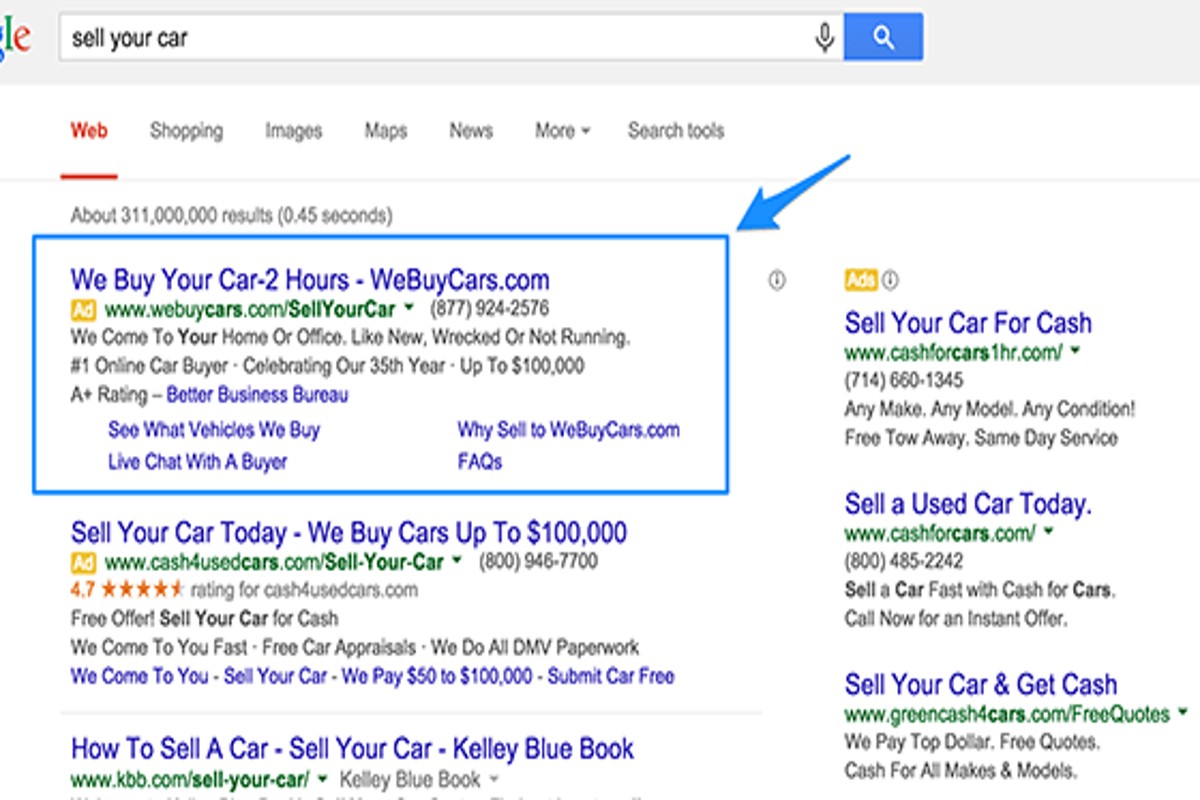
How to write perfect Google Ads copy involves crafting clear and concise messaging that effectively highlights the benefits of a product or service while incorporating a strong call to action. The ideal character limits are 90 for headlines and 180 for descriptions, ensuring maximum visibility and engagement.
Mastering the art of Google Ads copywriting is crucial for businesses aiming to enhance their online visibility and drive conversions. With over 3.5 billion searches conducted daily on Google, effective ad copy can significantly impact a company’s bottom line. Failing to grasp this skill can lead to wasted advertising spend and missed opportunities for growth.
Businesses that overlook the importance of well-crafted Google Ads copy risk significant financial losses, as poorly written ads can lead to low click-through rates and diminished return on investment. Each ineffective ad not only squanders resources but also allows competitors to capture market share.
This article will provide a comprehensive guide on how to write perfect Google Ads copy, covering essential strategies, best practices, and examples to help you
optimize your ad campaigns for better performance and increased ROI.
What are the best practices for writing Google Ads copy?
Effective Google Ads copy features clear messaging, strong calls to action (CTAs), and strategic keyword integration. Research indicates that ads with clear CTAs can boost click-through rates by as much as 30% in competitive industries.
- Use clear and concise language: Keep headlines to 30 characters and descriptions to 90 characters. Make sure the messaging is straightforward. Avoid jargon or complex phrases that could confuse the reader.
- Incorporate relevant keywords: Conduct keyword research to pinpoint terms potential customers are using. Integrating these keywords naturally into the ad copy can enhance ad relevance and quality scores — this often leads to lower costs.
- Highlight unique selling points (USPs): Clearly explain what differentiates the product or service from competitors. This includes special offers, benefits, or features that resonate with the target audience (this is often overlooked).
- Include a strong call to action (CTA): Use actionable phrases like “Buy Now,” “Get a Free Quote,” or “Sign Up Today.” A compelling CTA encourages users to act quickly, significantly boosting conversion rates.
- Test different ad variations: Implement A/B testing to compare different headlines, descriptions, and CTAs. Analyzing performance data helps pinpoint the most effective copy for your target audience.
Expert insight: Regularly review ad performance metrics and adjust your copy based on what resonates with your audience. Continuous optimization is crucial — it maintains high engagement and conversion rates in competitive markets.
How long should Google Ads copy be?
Google Ads headlines should ideally be 30 characters. Descriptions can extend to 90 characters to meet display limits.
The character limits exist to boost visibility and engagement in search results. Ad headlines must be concise yet compelling — they need to grab user attention quickly. Descriptions, while a bit longer, should still deliver the message clearly and drive clicks.
- Headlines: Maximum of 30 characters for each of the three headline fields available in a standard ad format.
- Descriptions: Up to 90 characters for each of the two description fields, allowing for more detailed information.
- Display URL: Typically, the display URL can be up to 15 characters, though the actual URL may be longer.
Adhering to these character limits is crucial. However, the ad’s content context also plays a significant role. Ads should align with user intent and the keyword strategy in use. Google may automatically truncate longer headlines or descriptions — this can impact how the ad is perceived. Creating succinct and impactful copy that conveys the key message within these constraints is essential for maximizing ad performance.
Expert insight: Prioritize clarity and action-oriented language within the character limits to enhance click-through rates. Use A/B testing to figure out which headlines and descriptions resonate best with your target audience (this is often overlooked).
What makes Google Ads copy effective?
Effective Google Ads copy is concise, relevant, and features a compelling call to action. Studies show that ads with clear CTAs can increase conversion rates by up to 40%. The language must resonate with the target audience, directly addressing their needs.
1. Clarity and Conciseness: The best Google Ads copy conveys the message in as few words as possible. Aim for 90 characters or less. This ensures the main point is clear — and easily digestible.
2. Audience Relevance: Tailor ads to specific demographics, interests, and behaviors. Use language that reflects the audience’s preferences and pain points. This can make them feel understood and catered to (this is often overlooked).
3. Compelling Call to Action: A strong CTA prompts users to take action. Phrases like “Get Started Today” or “Shop Now” create a sense of urgency. They encourage immediate responses.
4. Keyword Integration: Incorporate relevant keywords naturally within the copy. This boosts visibility in search results and aligns the ad with user intent, improving click-through rates.
5. Testing and Optimization: Regularly test different versions of ad copy to identify what resonates best. Use A/B testing to compare variations. Optimize based on performance metrics.
Expert insight: Continuously analyze performance data to refine your approach. Ads that evolve with user behavior and preferences are more likely to maintain engagement — and drive conversions over time.
Can I use emojis in Google Ads copy?
Yes, emojis can be used in Google Ads copy to boost visibility and engagement. However, they should be used sparingly and in a relevant context. Recent studies indicate that ads with emojis can increase click-through rates by up to 20% when applied appropriately.
When incorporating emojis, consider your target audience and the message being conveyed. For instance, a local bakery promoting a seasonal sale might use a cupcake emoji to grab attention. This emoji complements the text, making the ad more relatable and visually appealing. But overusing emojis — or placing them in the wrong context — can detract from the message and confuse potential customers. Striking a balance is essential.
Additionally, be aware of platform guidelines and the character limits for your ads. Google allows emojis in certain ad formats, but they might not display correctly on all devices. Testing different versions of your ad can help determine the effectiveness of emoji use. The result is often a clearer message that enhances engagement without compromising professionalism.
Expert insight: Use emojis that align with your brand voice and keep a clear connection to your product or service. This approach ensures that the use of emojis amplifies your message rather than distracts from it (this is often overlooked).
What common mistakes should I avoid in Google Ads copy?
Avoiding common mistakes in Google Ads copy is crucial for maximizing click-through rates and conversions. Key issues to watch out for include using jargon, vague language, and overlooking a clear call to action. Almost 70% of ads fail to engage users because of these problems, resulting in wasted ad spend.
Effective Google Ads copy needs to communicate clearly and directly. Here are specific mistakes to steer clear of:
- Avoid jargon: Industry-specific terms can alienate potential customers. Use simple, accessible language that resonates with a wider audience.
- Steer clear of vague language: Phrases like “best service” or “great deals” lack concrete information. Be specific about what makes your offering stand out — whether it’s unique features or benefits (this is often overlooked).
- Include a clear call to action: Not directing users on what to do next can cause indecision. Use strong, actionable phrases like “Shop Now” or “Get Your Free Quote” to guide them effectively.
- Neglecting your target audience: Tailor your message to meet the needs and interests of your specific audience. Conduct research to grasp their pain points and preferences, because understanding them is vital.
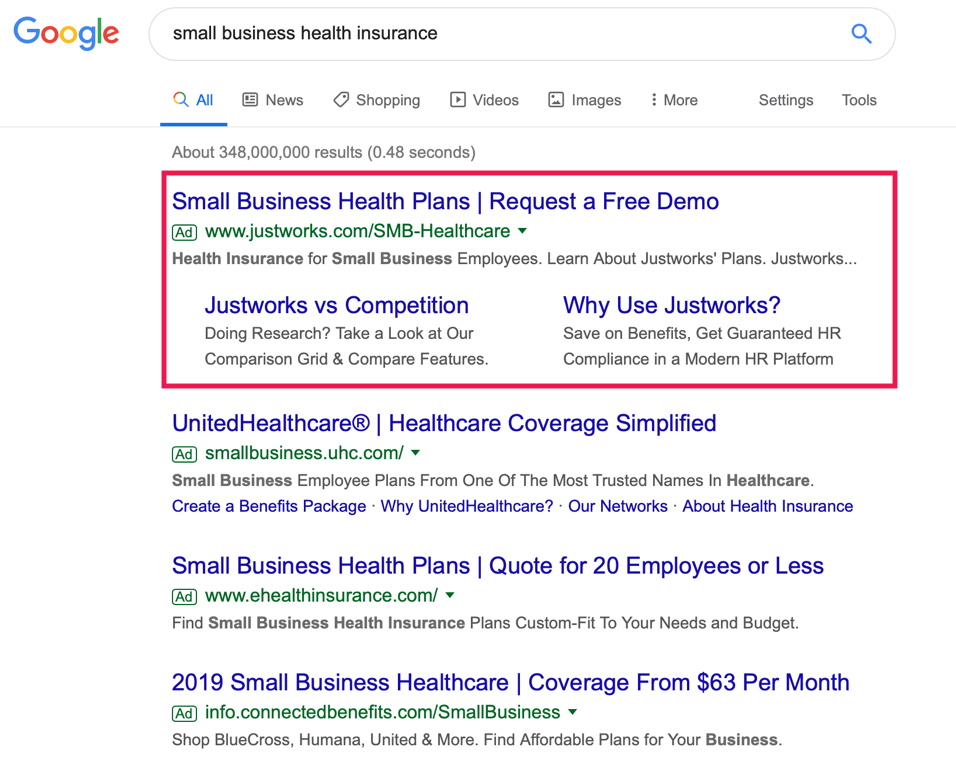
- Ignoring ad extensions: Failing to utilize ad extensions can limit your ads’ effectiveness. Include site links, call extensions, and location information to add value and encourage more clicks.
Expert insight: Regularly analyze ad performance metrics to spot areas for improvement. A/B testing different copy variations can refine messaging — and significantly enhance engagement rates.
How can I test my Google Ads copy for effectiveness?
Testing Google Ads copy for effectiveness involves A/B testing — a method where two or more variations of an ad are compared to determine which performs better. This approach can lead to significant improvements in click-through rates. In fact, rates often increase by 20% or more when optimized correctly.
To implement A/B testing effectively, follow these steps:
- Define Your Objective: Determine what you want to achieve with your ad copy. This could be about increasing clicks, conversions, or overall engagement.
- Create Variations: Develop at least two versions of your ad that have distinct differences. This could include variations in headlines, descriptions, or calls-to-action.
- Set Up Your Campaign: Launch your A/B test within Google Ads. Make sure both ads are shown to similar audiences — this helps maintain testing integrity.
- Monitor Performance: Keep an eye on key performance metrics, such as click-through rates (CTR), conversion rates, and cost per acquisition (CPA). Use a testing period of at least two weeks for reliable data (this is often overlooked).
- Analyze Results: After the testing period, compare each ad’s performance. Identify which ad better meets your objective and consider why it performed that way.
- Iterate: Use insights gained to refine your ad copy. Conduct new tests with adjusted variations to keep optimizing performance.
Testing isn’t a one-time process. It’s crucial to continually evaluate and modify your Google Ads copy to adapt to changing audience preferences and market conditions.
Expert insight: Regularly refreshing ad copy can lead to sustained engagement. Aim to test new variations every 3-4 months — this keeps content relevant and effective.
What keywords should I include in my Google Ads copy?
Include high-intent keywords relevant to your audience and product. These keywords should reflect what potential customers actively search for — this boosts ad relevance and can improve your Quality Score. Aim for at least three to five targeted keywords in your ad copy.
When selecting keywords, focus on three main categories: branded keywords, product-specific keywords, and long-tail keywords. Each type plays a distinct role in driving traffic and conversions.
- Branded Keywords: These keywords include your brand name. They attract users already familiar with your brand and usually lead to higher conversion rates.
- Product-Specific Keywords: These keywords relate directly to the products or services you offer. For instance, if selling running shoes, use terms like “buy running shoes” or “best running shoes for women.”
- Long-Tail Keywords: These are more specific phrases that often have lower search volume. However, they carry higher intent, such as “affordable running shoes for beginners.” They tend to attract users who are further along in the buying process.
Using a mix of these keywords can help create a balanced approach. Branded keywords build recognition, while product-specific and long-tail keywords capture a broader audience seeking specific solutions. Make sure to regularly analyze keyword performance to refine your choices — this can significantly enhance ad effectiveness.
Expert insight: Regularly update your keyword strategy based on changing trends and customer behavior (worth double-checking) to maintain ad relevance and effectiveness in a competitive landscape.
How do I write a compelling call to action for Google Ads?
A compelling call to action (CTA) for Google Ads needs to use action-oriented language that prompts an immediate response. Phrases like “Get Started Today” or “Claim Your Offer Now” are effective. Effective CTAs can increase click-through rates by up to 50% — making them essential for successful ad campaigns.
To craft an effective CTA, consider these steps:
- Use strong action verbs: Start with imperative verbs that urge users to take immediate action. Words like “Download,” “Subscribe,” or “Shop” work well.
- Create a sense of urgency: Incorporate phrases that suggest time sensitivity. Options like “Limited Time Offer” or “Act Now” can encourage quick decisions.
- Highlight benefits: Clearly convey what the user gains by taking action. For instance, “Unlock Exclusive Discounts” or “Get Your Free Trial Today” are strong examples.
In addition to these steps, it’s important to consider your target audience. Tailor your language to resonate with their needs and preferences (this is often overlooked). Testing different CTAs can also provide insights into what works best for your specific audience. Experiment with variations — identify which phrases yield the highest engagement.
Expert insight: Regularly analyze the performance of your CTAs using A/B testing to refine your approach. Small changes in wording can often lead to significant impacts on user behavior and conversion rates.
Understanding Google Ads Structure
This section covers the essential components of Google Ads, such as headlines, descriptions, and display URLs. Understanding these elements is crucial for creating compelling ad copy that drives performance.

Breakdown of Ad Components
Google Ads includes several key components that must work together to effectively capture user attention. These components are:
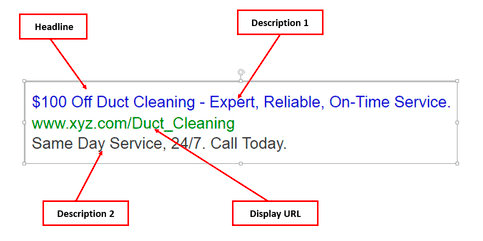
- Headlines: Usually, there are three headlines, each limited to 30 characters. They are the first elements users notice, making them crucial for engagement.
- Descriptions: There are two description lines that allow for 90 characters each. This section offers more context and detail about the offering — it’s designed to encourage users to take action.
- Display URLs: The display URL represents your website address and should be relevant to the ad content. It consists of a domain and optional path fields that enhance relevance (this is often overlooked).
Character Limits and Visibility
Character limits are critical in Google Ads. They directly affect how the ad appears and its visibility. The limited space requires concise and impactful language. Ads that exceed character limits get truncated, potentially cutting out essential details that could sway a user’s decision. Recent data indicates that ads adhering to character limits see a 30% higher click-through rate (CTR) compared to those that don’t.
The Role of Ad Extensions
Ad extensions improve the visibility and effectiveness of Google Ads by adding information that boosts performance. These can include:
- Sitelink Extensions: Direct users to specific pages on your site.
- Call Extensions: Enable users to call your business directly.
- Location Extensions: Display your business address, making it easier for users to locate you.
Using ad extensions can enhance the overall ad rank and increase the chances of user engagement — it’s a vital part of a successful campaign.
Ad Rank and Quality Score
Understanding ad rank and quality score is vital for optimizing Google Ads copy. Ad rank determines where your ad appears on the search results page. It’s influenced by bid amount, quality score, and the expected impact of ad extensions. The quality score, which ranges from 1 to 10, assesses the relevance of keywords, ad copy, and the landing page experience. A higher quality score often leads to lower costs per click and better ad placements.
To achieve a high quality score, focus on creating engaging, relevant ad copy that aligns with user intent. Ads boasting a quality score of 7 or higher can cut costs by around 50% compared to those with lower scores.
Many advertisers wrongly assume that simply increasing their bids will enhance their ad position. However, if the ad copy lacks relevance or engagement, this strategy may backfire. A well-crafted ad that resonates with the target audience will outperform a high-bid ad featuring weak copy.
Practical Application
To effectively apply this knowledge, follow these steps:
- Draft several headlines and descriptions, ensuring they fit within the character limits.
- Use relevant ad extensions to boost visibility and convey extra information.
- Regularly review and optimize your quality score by analyzing ad performance and making necessary adjustments.
By concentrating on these elements, advertisers can greatly improve their ability to write effective Google Ads copy that captures attention and drives conversions.
Crafting Compelling Headlines
Effective headlines are the backbone of successful Google Ads. They represent the first interaction potential customers have. Creating attention-grabbing headlines is crucial to driving clicks and conversions.
Utilizing Power Words and Emotional Triggers
Incorporating power words can greatly boost the emotional appeal of your headlines. Words like “free,” “exclusive,” and “guaranteed” provoke strong reactions and can drive users to click. Emotional triggers such as urgency (“limited time offer”) or curiosity (“discover the secret”) enhance engagement even further. A 2024 study by WordStream found that ads utilizing emotional language had click-through rates (CTR) increase by up to 25% compared to neutral wording.
Incorporating Numbers and Statistics for Credibility
Numbers convey authority and clarity effectively in your headlines. For instance, headlines that include specific figures (e.g., “Save 30% Today!”) or statistics (e.g., “Join 10,000 Satisfied Customers”) build trust and encourage clicks. A recent analysis indicated that ads featuring numerical data saw CTR rise by 20% compared to those without. This strategy grabs attention — and it also provides a clear value proposition.
Testing Different Headline Formats for Performance
A/B testing various headline formats is essential for optimizing ad performance. It’s worthwhile to experiment with questions, direct commands, or statements. For example, compare a question like “Want to Boost Your Sales?” against a direct command such as “Boost Your Sales Now!” This iterative process helps advertisers identify which formats resonate best with their target audience, leading to higher engagement rates.
Aligning Headlines with User Search Intent
Understanding user search intent is crucial when crafting headlines. Headlines should directly address the queries users enter into Google. For instance, if users search for “best running shoes,” a headline like “Top 5 Running Shoes for 2024” aligns perfectly with their intent. This alignment enhances CTR and reduces bounce rates, as users find relevant content that meets their needs effectively.
Many advertisers overlook the importance of aligning headlines with user intent — often opting for catchy phrases instead of relevant content. This can create high click rates but low conversions, as users might feel misled. A focus on relevance helps ensure that the traffic driven by the ad is more likely to convert.
Practical Application
To implement these strategies effectively, follow these steps:
- Identify your target audience and their emotional triggers.
- Use power words and numbers in your headlines to enhance appeal.
- A/B test different headline formats to determine what works best.
- Make sure your headlines align closely with user search intent.
By following these steps, advertisers can create compelling headlines that not only attract clicks but also drive conversions. This ultimately leads to mastering how to write perfect Google Ads copy.
Writing Persuasive Descriptions
Crafting effective Google Ads descriptions is crucial for turning clicks into meaningful actions. This section explores strategies that boost the persuasive impact of your ads — ensuring they resonate with potential customers and drive engagement.
Highlighting Unique Selling Propositions (USPs)
Identifying and clearly stating your unique selling propositions (USPs) distinguishes your ad from the competition. A strong USP conveys what makes your product or service both distinct and appealing. For example, if your company provides 24/7 customer support, highlight this feature prominently in your ad description. Research shows that ads showcasing a compelling USP can raise click-through rates (CTR) by up to 30%.
Creating a Sense of Urgency and Exclusivity
Incorporating urgency can spur potential customers to act swiftly. Phrases like “limited time offer” or “only a few left in stock” create a fear of missing out (FOMO) that prompts immediate responses. Plus, emphasizing exclusivity — such as “members-only discounts” — can further enhance the perceived value of your offer. A survey conducted in 2024 found that ads conveying urgency can boost conversion rates by 25%.
Using Customer-Centric Language to Address Pain Points
Effective ad descriptions should directly address the target audience’s pain points. Use customer-centric language that tackles their specific needs and challenges. For instance, instead of saying “We sell high-quality shoes,” try rephrasing to “Say goodbye to foot pain with our supportive, stylish shoes.” This method not only highlights the benefits but also resonates with customers’ experiences (this is often overlooked).
Incorporating Keywords Naturally for SEO Benefits
Integrating relevant keywords into your ad descriptions is essential for visibility. However, it’s critical to do so in a natural manner to maintain readability. Research indicates that ads with keyword-rich descriptions can enhance ad ranking and increase the chances of appearing in relevant searches. Aim for a keyword density of about 1-2% to optimize performance while keeping the text flowing naturally.
Nuance and Expert Layer
Many marketers underestimate the value of testing different ad copy variations. A/B testing can uncover which descriptions resonate best with your audience. Additionally, some believe that longer descriptions guarantee better performance; however, shorter, impactful descriptions often outperform their longer counterparts. Focus on clarity and engagement — not just word count — to maximize effectiveness.
Practical Application
- Identify and articulate your USPs in each ad description.
- Create urgency with time-sensitive offers or limited stock messages.
- Use language that explicitly addresses and alleviates customer pain points.
- Incorporate relevant keywords naturally within your descriptions.
- Conduct A/B tests on different variations to find which copy performs best.
Implement these strategies to significantly enhance the persuasive power of your Google Ads descriptions, ensuring they effectively convert clicks into tangible actions.
Analyzing and Optimizing Ad Performance
This section covers the methods for assessing and enhancing the effectiveness of Google Ads copy. Monitoring performance metrics is critical — and leveraging insights can significantly boost ad impact and return on investment.
Key Performance Indicators (KPIs) to Monitor
To evaluate the effectiveness of Google Ads copy, pay attention to these key performance indicators:
- Click-Through Rate (CTR): This represents the percentage of users who engaged with the ad after seeing it. A higher CTR often indicates compelling copy.
- Conversion Rate: This measures the percentage of users who completed a desired action—like making a purchase or signing up—after clicking the ad. The result is often a reflection of the ad’s actual effectiveness in driving user behavior.
- Quality Score: Google assigns a score based on the relevance of the ad copy, keywords, and landing page experience. Higher scores generally lead to better ad placements and reduced costs.
Tools for Tracking Ad Performance and User Engagement
Using the right tools is essential for monitoring ad performance. Consider these options:
- Google Ads Dashboard: This provides comprehensive insights into key metrics, such as CTR, conversion rates, and Quality Score.
- Google Analytics: This offers an in-depth analysis of user behavior after clicks, allowing for a better understanding of how ad copy influences landing page engagement.
- A/B Testing Tools: Tools like Optimizely or Google Optimize allow for direct comparison of different ad copies, which helps identify the best-performing variations.
Iterative Testing and Refining Based on Data Insights
Data-driven decision-making is vital for optimizing Google Ads copy. Follow this iterative testing process:
- Develop Variations: Create several versions of ad copy that differ in headlines, descriptions, and calls to action.
- Run A/B Tests: Deploy these variations to a segment of your audience while controlling other factors to see which copy performs better.
- Analyze Results: Assess the collected data to evaluate CTR, conversion rates, and Quality Scores. Identify which copy resonates most with your audience.
- Refine and Repeat: Based on insights gained, fine-tune the ad copy and repeat the testing process for continuous improvement.
Leveraging Feedback and User Behavior for Continuous Improvement
Alongside quantitative metrics, qualitative feedback is crucial in refining ad copy. Monitor user engagement through:
- Surveys and Polls: Gather direct feedback from users about their perceptions of the ad and its relevance (this is often overlooked).
- Heatmaps and Session Recordings: Tools like Hotjar visualize user interactions with landing pages, revealing what captures attention.
- Social Listening Tools: Monitor social media channels for mentions of your brand and keywords related to your ads. This helps gauge public sentiment.
Expert Insights
Many marketers underestimate the potential of micro-testing. Instead of making broad changes to ad copy, focus on small, incremental adjustments. For instance, changing a single word in a call to action can lead to significant shifts in CTR. Plus, some ads might perform better at different times of the day or week — analyzing performance data across various time frames can reveal these nuances.
Practical Application
To implement these strategies effectively:
- Regularly review performance metrics to spot trends and areas that need improvement.
- Use A/B testing to refine ad copy based on data insights.
- Engage users with surveys to gather qualitative feedback on ad effectiveness.
- Continuously iterate on ad copy, making small adjustments according to performance data.
Frequently Asked Questions
What are the best practices for writing Google Ads copy?
Best practices for writing Google Ads copy include using clear and concise language, focusing on the benefits of your product or service, and incorporating relevant keywords. Additionally, ensure your ad aligns with the landing page for a seamless user experience.
How long should Google Ads copy be?
Google Ads copy should be succinct, typically around 90 characters for headlines and 180 characters for descriptions. Keeping it concise helps capture attention and encourages clicks.
What makes Google Ads copy effective?
Effective Google Ads copy is clear, compelling, and targeted to the audience’s needs. It incorporates strong keywords, a clear value proposition, and a persuasive call to action.
Can I use emojis in Google Ads copy?
Emojis can be used in Google Ads copy, but their effectiveness varies by audience and industry. Use them sparingly and ensure they align with your brand’s voice to avoid distracting from the message.
What common mistakes should I avoid in Google Ads copy?
Avoid common mistakes such as using vague language, neglecting to include a call to action, and failing to target the right audience. Additionally, steer clear of excessive jargon that may confuse potential customers.
How can I test my Google Ads copy for effectiveness?
Testing Google Ads copy can be done through A/B testing, where different versions of ads are run simultaneously. Monitor metrics such as click-through rates and conversion rates to determine which copy performs best.
What keywords should I include in my Google Ads copy?
Include relevant keywords that align with user search intent and your product or service. Research keywords using tools like Google Keyword Planner to ensure they are commonly searched by your target audience.
How do I write a compelling call to action for Google Ads?
A compelling call to action (CTA) should be clear, direct, and create a sense of urgency. Phrases like “Shop Now,” “Get a Free Quote,” or “Sign Up Today” encourage users to take immediate action.
Final Thoughts on how to write perfect google ads copy
Effective Google Ads copy is not just about following best practices; it requires a deep understanding of audience psychology and strategic messaging. The ability to create compelling headlines and persuasive descriptions can significantly enhance click-through rates and conversions.
To elevate your Google Ads copy, conduct A/B testing on different headlines and descriptions to identify what resonates best with your target audience, ensuring your messaging evolves based on real user engagement.
Ready to elevate your ad strategy? Consult a google ads expert to help you craft compelling copy that drives results.
Mastering Google Ads copywriting is essential for driving measurable results in an increasingly competitive digital landscape.