
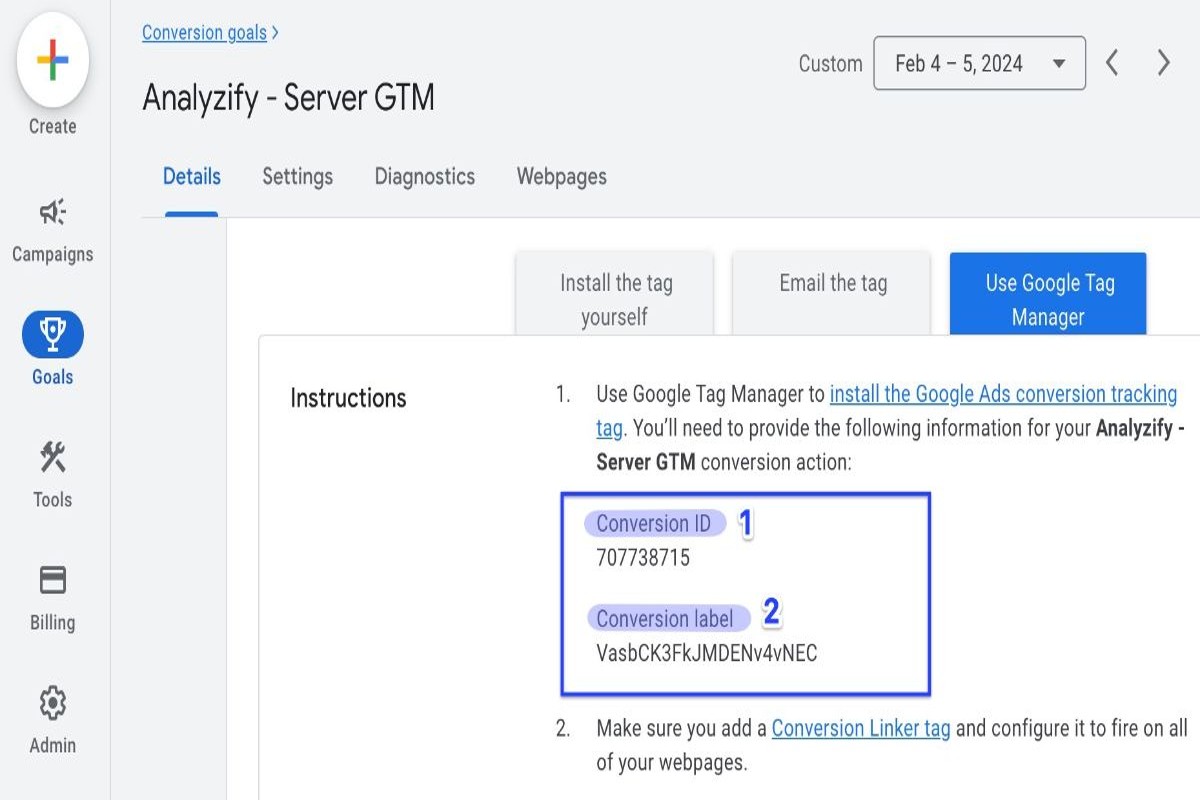
To find the conversion ID in Google Ads, navigate to the ‘Tools & Settings’ menu, select ‘Conversions’, and then choose the specific conversion action. This unique identifier is essential for accurately tracking ad performance and calculating return on investment (ROI), ensuring effective campaign management.
Understanding where to find conversion ID in Google Ads is crucial for digital marketers and businesses looking to optimize their advertising efforts. Properly tracking conversions enables companies to measure the effectiveness of their campaigns and improve overall marketing strategies. According to a report by eMarketer, businesses that effectively utilize conversion tracking can increase their ROI by up to 30%.
Failure to grasp the significance of conversion IDs can result in missed revenue opportunities, wasted advertising spend, and a competitive disadvantage in the marketplace. Without accurate tracking, businesses may struggle to assess which campaigns deliver the best results, ultimately hindering growth.
This article will provide a comprehensive overview of how to locate your conversion ID in google ads, including step-by-step instructions, best practices for tracking conversions, and tips for leveraging this information to enhance your advertising strategy.
What is a conversion ID in Google Ads?
A conversion ID in Google Ads is a unique identifier assigned to each conversion action set up within a Google Ads account. This ID is crucial for tracking and attributing conversions accurately. It allows advertisers to measure how effective their campaigns are and optimize accordingly.
Conversion IDs are essential in Google Ads’ tracking system. When a user interacts with your ad and then completes a desired action on your website—like making a purchase or signing up for a newsletter—the conversion ID links that action back to the specific ad and campaign. This connection helps advertisers evaluate which strategies drive results and allocate budgets more effectively.
- Types of Conversions: Conversion actions can include various activities, such as purchases, sign-ups, or downloads. Each type generates its own unique conversion ID.
- Tracking Method: The conversion ID is embedded in the conversion tracking code placed on your website. This setup allows Google Ads to identify and report on conversions accurately.
- Impact on Reporting: Accurate conversion tracking, facilitated by conversion IDs, can significantly enhance reporting metrics. This provides insights into return on investment (ROI) and overall campaign performance.
Expert insight: Regularly reviewing and updating your conversion actions and their associated IDs is wise. It can help ensure that tracking remains accurate and relevant—this ultimately leads to better decision-making and improved campaign performance.
How do I find my conversion ID in Google Ads?
The conversion ID in Google Ads is located in the account settings under the “Conversions” section. This unique identifier is critical for tracking conversion actions accurately. It’s usually a numeric value linked to each specific conversion action.
To locate your conversion ID, follow these steps:
- Log into your Google Ads account. Access the platform using your credentials. Make sure you have the necessary permissions to view conversion settings.
- Navigate to the Tools and Settings menu. You can find this in the upper right corner of the interface, represented by a wrench icon.
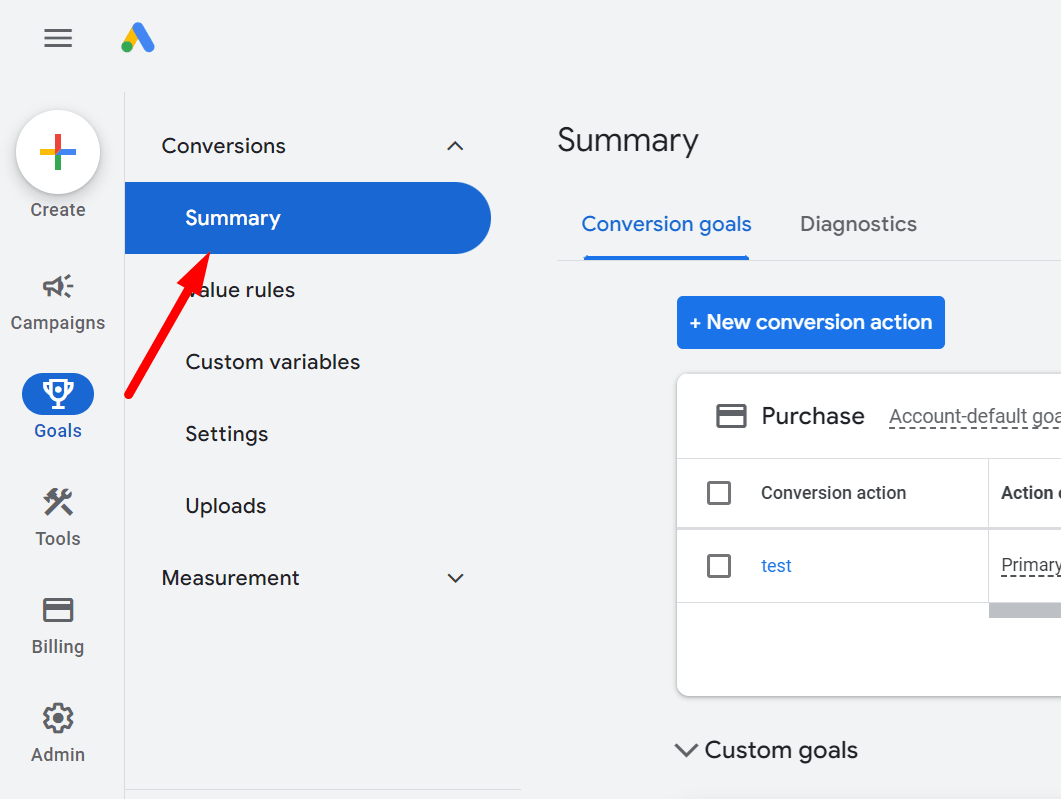
- Select Conversions under Measurement. From the dropdown menu, click on “Conversions” to view all the conversion actions set up in your account.
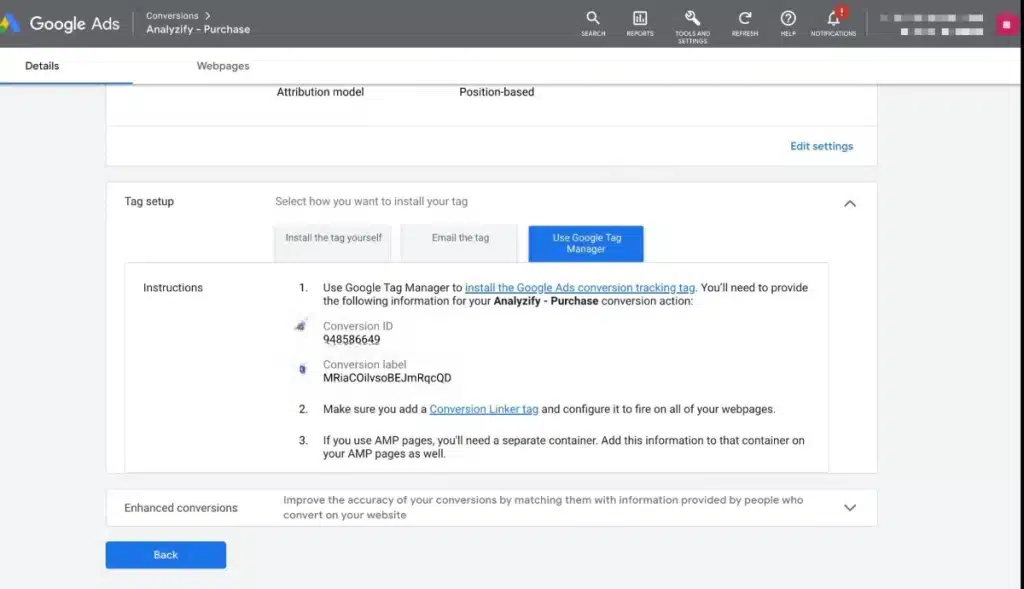
- Choose the specific conversion action. From the list, select the conversion action for which you want to find the ID. This will open a detailed view of that conversion.
- Locate the Conversion ID. In the details section, you’ll see the Conversion ID clearly listed. This number is usually formatted as a sequence of digits.
Knowing where to find the conversion ID in Google Ads helps businesses track and analyze their advertising performance effectively. This ID is crucial for integrating with other platforms — and for ensuring accurate conversion tracking.
Expert insight: It’s wise to regularly review your conversion actions and IDs. Confirm they align with your current marketing goals (this is often overlooked), as this can significantly impact campaign performance and optimization strategies.
Why is the conversion ID important in Google Ads?
The conversion ID plays a crucial role in Google Ads. It uniquely identifies conversions tracked by ad campaigns. This identifier helps advertisers measure how effective their ads are in driving desired actions—such as purchases or sign-ups. In 2024, businesses that effectively use conversion tracking can see a significant boost—up to a 30% improvement—in return on ad spend (ROAS).
The conversion ID links data from the Google Ads account with the website or app. This connection provides insights into user behavior after they interact with ads. For example, if a retail company runs a campaign promoting a new product, they can use the conversion ID to see how many users who clicked on the ad completed a purchase. This information is vital for understanding which ads are performing well—and which ones aren’t—allowing for data-driven adjustments to optimize campaign performance.
Moreover, the conversion ID helps in attributing conversions to specific ads, keywords, and campaigns. Suppose a user sees an ad for a shoe store, clicks on it, but later converts after encountering a retargeting ad on social media. The conversion ID captures this multi-touch attribution, providing the advertiser with a clear view of the entire customer journey (this is often overlooked). This comprehensive tracking is essential for effectively allocating budgets and enhancing overall strategy.
Expert insight: Regularly review and analyze conversion data tied to your conversion IDs to spot trends and optimize your campaigns. Implementing A/B testing on different ad variations linked to specific conversion IDs can help refine the approach and maximize advertising efficiency.
Can I have multiple conversion IDs in Google Ads?
Yes, multiple conversion IDs can exist in Google Ads. Each conversion action you set up gets a unique conversion ID. This allows tracking of different types of conversions separately — think purchases, sign-ups, or page views.
Effectively managing multiple conversion IDs requires a structured approach. Here are some best practices to follow:
- Define Clear Conversion Goals: Establish specific objectives for each conversion action. This clarity helps determine which conversions matter most for your campaigns.
- Utilize Descriptive Naming Conventions: Use clear and descriptive names for each conversion action. This practice aids in easy identification (this is often overlooked) and reduces confusion when analyzing performance.
- Regularly Review Conversion Performance: Periodically assess the effectiveness of each conversion action. This evaluation lets you adjust based on performance data — ensuring you focus on the most impactful conversions.
- Implement Conversion Tracking Code Correctly: Make sure the tracking code for each conversion ID is implemented accurately on the relevant web pages. This step is crucial for effective data collection and reporting.
- Group Similar Conversions: If applicable, consider grouping similar conversion actions under broader categories. This strategy simplifies reporting and gives a clearer view of overall performance.
Expert insight: When handling multiple conversion IDs, leverage Google Ads’ reporting tools to create custom reports that target your key performance indicators. This helps streamline decision-making (worth double-checking) based on actionable data.
What should I do if my conversion ID is missing?
If your conversion ID is missing in Google Ads, several troubleshooting steps can help you locate or restore it. This issue can happen for various reasons — account misconfiguration is one example — or even changes in your tracking setup.
- Check your Google Ads account settings. Navigate to the “Tools & Settings” menu and select “Conversions” under the “Measurement” section. Make sure the conversion actions you’re tracking are properly set up and active.
- Verify your tracking tags. If you’re using Google Tag Manager, confirm that the right tags are published. Look for errors in the implementation. Use “Preview” mode to test the tags in real time.
- Review your user permissions. Make sure you have the necessary permissions to view conversion IDs in your Google Ads account. If you’re part of a larger team, it’s worth double-checking with your account administrator.
- Check for recent changes. If you or someone on your team recently altered conversion settings, it might have inadvertently impacted the visibility of the conversion ID. Look for any recent updates or changes made in the account.
- Contact Google Ads Support if necessary. If you’ve tried the previous steps and still can’t find your conversion ID, reaching out to Google Ads support can provide further assistance. They can help identify any account-specific issues that are affecting your conversion tracking.
Expert insight: Regularly audit your conversion tracking setup to prevent issues with missing conversion IDs. Staying proactive can help maintain accurate tracking. This will optimize your advertising efforts more effectively.
How do conversion IDs impact ad performance tracking?
Conversion IDs are critical for accurately measuring how ads perform in Google Ads. They link specific user actions to advertising efforts, allowing marketers to evaluate key performance metrics like return on ad spend (ROAS) and conversion rates. Efficient tracking can significantly improve ad performance. In some cases, it can increase conversion rates by up to 30%.
Conversion IDs serve as unique identifiers for each conversion action tracked within Google Ads. They help advertisers distinguish between various types of conversions, such as purchases, sign-ups, or downloads. This differentiation allows for more granular analysis of which ads and keywords drive valuable actions. In contrast, general performance metrics—like click-through rates (CTR) and overall impressions—offer a broader view but miss the specific insights related to conversion actions. While CTR measures user engagement, conversion IDs focus on real results, providing a clearer view of campaign success.
- Conversion IDs: Unique identifiers for specific actions, enabling detailed tracking and analysis.
- Performance Metrics: General statistics like CTR and impressions that gauge engagement but don’t account for conversions.
- Attribution Models: Methods that allocate credit for conversions across multiple touchpoints — sometimes complicating the relationship with conversion IDs.
Using conversion IDs effectively can lead to better optimization strategies. Advertisers can adjust bids, budgets, and ad creatives based on the performance of specific conversions. This targeted approach allows for a more efficient allocation of resources and maximizes the overall impact of the advertising campaign. Additionally, understanding the correlation between conversion IDs and other performance metrics can provide insights into customer behavior and preferences (this is often overlooked).
Expert insight: Regularly analyze conversion ID data alongside performance metrics to identify high-performing channels. This will enable more precise budget allocation and campaign adjustments. Ultimately, these efforts enhance overall ad effectiveness.
How often should I check my conversion ID in Google Ads?
Conversion IDs in Google Ads should be checked at least once a month. This ensures they’re implemented correctly and tracking conversions accurately. For businesses running frequent campaigns or making regular updates, a bi-weekly review is advisable.
Several factors influence how often to check your conversion ID. The frequency of your advertising campaigns is a key consideration. If campaigns are launched or modified regularly, checking conversion IDs more often can lead to prompt resolution of any tracking changes. Additionally, significant shifts in business goals or product offerings might require more frequent checks to confirm that conversion tracking aligns with new objectives.
Another important factor is the performance of your ads and related conversions. If there are noticeable fluctuations in conversion data, it might signal issues with the conversion ID setup. Monitoring performance trends can help identify when to conduct a deeper review of your conversion settings — including the ID. Regular checks can also help ensure tracking remains compliant with updates in privacy regulations or platform changes (this is often overlooked).
Expert insight: Establish a routine for checking conversion IDs that matches your campaign schedule and performance reviews. This proactive approach minimizes tracking errors and enhances your advertising effectiveness.
Understanding Conversion Tracking in Google Ads
This section explores the mechanics of conversion tracking in Google Ads — a critical element for optimizing advertising efforts and measuring success in digital marketing campaigns.
Definition of Conversion Tracking
Conversion tracking refers to monitoring the actions taken by users after they interact with an advertisement. These actions, referred to as conversions, may include purchases, sign-ups, downloads, or other defined goals that indicate a successful engagement (this is often overlooked). In Google Ads, conversion tracking allows advertisers to assign value to their campaigns and evaluate which strategies deliver the best return on investment (ROI).
How Conversion Tracking Works
Conversion tracking works through the use of tracking codes placed on specific web pages or applications. After a user clicks an ad and completes a desired action, the tracking code captures that event. Here’s a breakdown of how it typically operates:
- Set up conversion actions in Google Ads.
- Generate a unique conversion tracking ID.
- Implement the tracking code on the conversion page (e.g., thank-you page).
- Monitor and analyze the data collected in Google Ads.
Benefits of Using Conversion Tracking
Effective conversion tracking brings several advantages for marketers:
- Data-Driven Decisions: By examining conversion data, advertisers can make informed adjustments to their campaigns.
- ROI Measurement: Conversion tracking enables precise calculations of ROI, which helps assess the financial effectiveness of advertising efforts.
- Improved Targeting: Insights from conversion data facilitate better audience targeting, enhancing ad performance over time.
Common Metrics Associated with Conversion Tracking
Key metrics are essential for evaluating the effectiveness of conversion tracking:
- Conversion Rate: The percentage of users who complete a desired action after clicking an ad. Typically, this ranges from 1% to 5% for most industries.
- Cost Per Conversion: The average cost incurred for each conversion—providing a clear financial picture of campaign efficiency.
- Conversion Value: The total revenue generated from conversions, critical for calculating overall campaign profitability.
Expert Insights on Conversion Tracking
Many marketers underestimate the importance of implementing conversion tracking properly. A common misconception is that all conversions carry equal value. However, different types of conversions can have varying impacts on the business. For instance, a lead generated from a contact form may not yield immediate revenue like a direct purchase does. Understanding these nuances helps marketers prioritize their targeting strategies and allocate budgets more effectively.
Practical Application of Conversion Tracking
To effectively leverage conversion tracking, businesses should:
- Clearly define conversion goals that align with business objectives.
- Regularly review conversion data to spot trends and areas needing optimization.
- Adjust ad spend based on the performance of different conversion types to boost ROI.
By understanding how to find conversion ID in Google Ads and implementing solid tracking practices, marketers can enhance their campaign strategies and drive measurable success.
Step-by-Step Guide to Setting Up Conversion Tracking
This section outlines a detailed process for setting up conversion tracking in Google Ads. It’s an essential component for optimizing advertising campaigns. Effective conversion tracking lets advertisers measure ad success and refine marketing strategies based on actual performance data.

Creating a Conversion Action
To begin, access your Google Ads account and navigate to the “Tools & Settings” menu. Under the “Measurement” section, select “Conversions.” Click the blue “+” button to create a new conversion action. You’ll need to define the type of conversion to track—options include website actions, app installs, phone calls, and import conversions. Each type serves distinct business needs. Choose the one that aligns with your goals.
Choosing the Right Conversion Type
Identifying the right conversion type is crucial for accurate tracking. Google Ads offers various options:
- Website Actions: Track specific actions taken on your site, like purchases or form submissions.
- App Installs: Monitor installations of your mobile app from ads.
- Phone Calls: Measure calls generated from ads, either directly or through call extensions.
- Import Conversions: This allows you to import offline conversions, linking in-store transactions to ad clicks.
Selecting the correct conversion type captures the most relevant data. This can help you understand user behavior effectively.
Implementing the Conversion Tracking Tag
After creating a conversion action, the next step is implementing the conversion tracking tag on your website. Google Ads provides two primary methods for this:
- Global Site Tag: A single piece of code placed in the header of every page on your site.
- Event Snippet: A separate code snippet placed on the specific page where the conversion occurs—like a thank-you page after a purchase.
Make sure both tags are implemented correctly to guarantee accurate tracking. Using Google Tag Manager can simplify this process, allowing for easier management of tracking codes.
Testing Your Conversion Tracking Setup
Testing your conversion setup is critical. It ensures data is recorded accurately. Google Ads includes a “Tag Assistant” tool to help verify whether the tags are firing correctly. You can also perform test conversions to see if they’re tracked in your Google Ads account. A best practice is to allow at least 24 hours before expecting data to populate.
Nuance / Expert Layer
Common misconceptions about conversion tracking include the belief that all conversions will be tracked automatically once the tags are installed. In reality, proper configuration of each conversion action is necessary for accurate reporting. Another frequent error is neglecting to account for different conversion types and their specific setup requirements. Each type has nuances that affect how data is collected and reported, which can influence optimization strategies.
Practical Application
To make the most of this information, follow the outlined steps meticulously. First, define your conversion goals. Then, choose the appropriate type, implement the tracking tags correctly, and conduct thorough testing. Regularly review your conversion data in Google Ads to assess campaign performance—and make data-driven adjustments to improve your advertising strategies.
Common Mistakes in Conversion Tracking
Effective conversion tracking in Google Ads is vital for optimizing campaigns and maximizing ROI. Yet, advertisers often fall into critical traps that undermine their tracking efforts. This can lead to inaccurate data and misguided strategies.
Not Defining Clear Conversion Goals
Ambiguity in conversion goals can greatly hinder campaign performance. Advertisers should establish specific, measurable, achievable, relevant, and time-bound (SMART) objectives. Instead of a vague aim like “increase sales,” a more precise goal would be “achieve a 20% increase in online sales within the next quarter.” This clarity aids in selecting the right conversion actions to track.
Incorrectly Implementing Tracking Codes
Correct implementation of tracking codes is crucial for accurately capturing conversion data. Common mistakes include:
- Placing codes on incorrect pages, like the homepage instead of the confirmation page.
- Forgetting to update codes after website redesigns or platform changes — a frequent oversight.
- Using outdated code versions that might not align with current tracking standards.
Recent data shows that up to 30% of advertisers misimplement tracking codes, creating significant gaps in data collection.
Failing to Test Conversion Actions
Testing conversion actions before launching campaigns is essential. Without this step, advertisers risk overlooking errors in their tracking setups. A/B testing can reveal if the intended actions are being captured correctly. For instance, testing various landing pages helps determine which version leads to higher conversion rates. Regular testing is key — it ensures tracking remains effective as campaign parameters evolve.
Neglecting to Monitor Conversion Data Regularly
Conversion data shouldn’t just be a one-time setup. Continuous monitoring is necessary for spotting trends and making informed decisions. Advertisers should review conversion metrics at least bi-weekly to catch any discrepancies or performance declines. Regular analysis allows for timely adjustments to campaigns, optimizing for higher conversion rates.
As of 2024, data indicates that businesses consistently monitoring their conversion metrics see a 25% higher ROI compared to those that don’t.
One common misconception is that once tracking is set up, it can be ignored. This perspective overlooks the dynamic nature of digital marketing, where changes in consumer behavior, market conditions, and platform algorithms can all necessitate updates to tracking strategies (this is often overlooked).
Practical Application
To enhance conversion tracking, advertisers should:
- Define specific conversion goals using the SMART framework.
- Make sure tracking codes are correctly implemented and regularly updated.
- Conduct thorough testing of conversion actions before full campaign launches.
- Establish a routine for monitoring conversion data and make adjustments as necessary.
By addressing these common mistakes, advertisers can improve their understanding of where to find conversion id in Google Ads. This knowledge helps in leveraging accurate data to drive campaign success.
Optimizing Your Campaign Based on Conversion Data
Using conversion data effectively is crucial for refining advertising strategies and boosting return on investment (ROI). This section dives into various tactics to leverage conversion data for optimizing Google Ads campaigns.
Analyzing Conversion Data Trends
Regularly analyzing conversion data trends helps advertisers spot patterns that inform strategic decisions. By keeping an eye on metrics like conversion rates, cost per conversion, and total conversions over time, marketers uncover insights into what drives successful outcomes. For example, a study from 2024 found that campaigns actively analyzing conversion trends saw a 25% increase in ROI within six months.
Adjusting Bids Based on Conversion Performance
Data-driven bid adjustments can really enhance campaign effectiveness. Increasing bids on high-performing keywords while cutting them on underperformers allows advertisers to allocate budgets more efficiently. Google Ads provides automated bidding strategies, like Target CPA and Target ROAS, which adjust bids based on predicted conversion performance. Advertisers must regularly review performance data to confirm that bidding aligns with current conversion trends.
A/B Testing Different Ad Variations
A/B testing is an essential method for optimizing ad performance. Testing different headlines, descriptions, and calls to action can reveal which variations yield the highest conversion rates. Systematically implementing A/B tests enables data-backed decisions instead of relying on hunches. In 2025, companies that engaged in A/B testing reported a 30% improvement in conversion rates — this illustrates its effectiveness.
Using Conversion Data for Audience Segmentation
Segmentation based on conversion data facilitates more targeted advertising efforts. By categorizing audiences according to their conversion behaviors, advertisers can craft messages and offers that resonate with specific groups. For instance, a retailer might segment users who often purchase high-ticket items and design campaigns specifically targeting this audience. This can potentially increase conversion rates by up to 40%.
Many misconceptions exist about the reliance on broad demographic data rather than conversion data for audience segmentation. A lot of marketers overlook the significance of behavioral insights derived from conversion actions (this is often overlooked). Focusing solely on demographics can lead to missed opportunities in effectively targeting high-converting segments. Understanding conversion behaviors enriches audience profiles, leading to more impactful ad placements.
To implement these strategies, advertisers should start by analyzing their conversion data in Google Ads. Identify high-performing keywords, adjust bids accordingly, and initiate A/B tests on various ad variations. Furthermore, segment audiences based on conversion behaviors to create tailored campaigns that speak directly to user interests. Regularly revisiting and refining these tactics ensures that campaigns stay in sync with evolving market conditions and consumer behaviors.
Frequently Asked Questions
What is a conversion ID in Google Ads?
A conversion ID in Google Ads is a unique identifier assigned to each conversion action you set up. It helps track specific actions taken by users after interacting with your ads.
How do I find my conversion ID in Google Ads?
To find your conversion ID, navigate to the “Tools & Settings” menu, select “Conversions,” and choose the specific conversion action. The conversion ID will be displayed in the details of that action.
Why is the conversion ID important in Google Ads?
The conversion ID is crucial for accurately tracking and measuring the effectiveness of your ad campaigns. It ensures that conversions are properly attributed to the right ads, enhancing your optimization efforts.
Can I have multiple conversion IDs in Google Ads?
Yes, you can have multiple conversion IDs in Google Ads, as each conversion action can have its own unique ID. This allows for detailed tracking of various conversion types across your campaigns.
What should I do if my conversion ID is missing?
If your conversion ID is missing, check your conversion settings to ensure the action is properly set up. If issues persist, consider recreating the conversion action to generate a new ID.
How do conversion IDs impact ad performance tracking?
Conversion IDs directly impact ad performance tracking by linking user actions to specific ads. Accurate tracking through these IDs allows for better data analysis and campaign optimization.
How often should I check my conversion ID in Google Ads?
It is advisable to check your conversion ID periodically, especially after making changes to your conversion settings or ad campaigns. Regular checks ensure that tracking remains accurate and effective.
Final Thoughts on where to find conversion id in google ads
Understanding and locating your conversion ID in Google Ads is critical for effective conversion tracking, enabling precise measurement of your campaign performance. A clear grasp of this element not only facilitates data-driven decision-making but also enhances your overall advertising strategy.
To maximize your tracking capabilities, log into your Google Ads account, navigate to the “Tools & Settings” menu, and systematically verify your conversion actions to identify and document your conversion IDs accurately.
For personalized assistance, consider reaching out to a google ads expert who can guide you through finding your Conversion ID effortlessly.
Mastering conversion tracking is essential for optimizing ad spend and driving meaningful business outcomes in a competitive digital landscape.