
To optimize Google Local Service Ads, businesses should focus on enhancing their profiles, collecting customer reviews, and employing targeted keywords. A well-optimized ad can increase customer inquiries by up to 25% and significantly improve conversion rates.
Understanding how to optimize Google Local Service Ads is essential for local businesses aiming to attract more customers in their specific service areas. With over 80% of consumers using local searches to find services, effective ad optimization can greatly enhance visibility and engagement. Failure to implement best practices may lead to missed opportunities in a competitive market, where every inquiry counts.
Businesses that neglect to optimize their Google Local Service Ads risk losing potential revenue, wasting marketing resources, and falling behind competitors who effectively leverage these tools. In a landscape where local services are increasingly sought after online, the stakes are high.
This article will provide a comprehensive guide on optimizing Google Local Service Ads, including best practices, effective keyword strategies, and insights into customer reviews. Readers will learn how to maximize their ad impact for increased visibility and customer acquisition.
What are Google Local Service Ads?
Google Local Service Ads (LSAs) are pay-per-lead advertisements that help local service providers connect with potential customers in their area. These ads show up at the top of Google search results when users look for specific services, such as plumbing or electrical work. In 2024, over 80% of consumers reported using LSAs to find local service providers — a clear sign of their effectiveness in local marketing.
LSAs differ from traditional google ads. They focus primarily on local services and let businesses showcase their offerings directly to nearby customers. Businesses that participate go through a vetting process by Google, which boosts trust and credibility among users. The ads present key information, like business name, phone number, service area, and customer ratings — this makes it easier for consumers to make informed choices (this is often overlooked).
- Service Listings: Each ad displays essential details about the services offered, including pricing estimates and customer reviews.
- Booking Option: Many LSAs include a direct booking feature, allowing users to schedule services instantly.
- Google Guarantee: Businesses that participate can earn a Google Guarantee badge — this reassures customers of their reliability.
Besides appearing at the top of search results, LSAs are also integrated with Google Maps. This further boosts visibility for local service providers. The leads generated through these ads tend to be of higher quality, as they’re aimed at users actively seeking specific services nearby. This targeted approach can help businesses improve conversion rates and maximize their marketing efforts.
Expert insight: To fully leverage the potential of Google Local Service Ads, businesses should consistently monitor and respond to customer reviews. High ratings significantly influence ad performance and consumer trust (worth double-checking).
How do I set up Google Local Service Ads?
Setting up Google Local Service Ads requires creating a business profile, verifying your business, and defining your service area. Following these steps helps ensure your ads reach the right audience effectively.
- Create a Google Business Profile: Visit the Google Business Profile page and sign in or create an account. Fill in your business information — name, address, phone number, and website are all necessary.
- Sign Up for Local Service Ads: Navigate to the Local Services Ads page and click on “Get Started.” Follow the prompts to enter your business details and select the services you offer (this is often overlooked).
- complete the Verification Process: Google requires verification for your business. This can lead to background checks and insurance verification depending on your industry — not every business faces the same requirements.
- Set Your Budget: Choose your weekly budget for leads. Google allows you to set a budget based on the average cost-per-lead in your industry; this often varies significantly by service type.
- Define Your Service Area: Clearly specify the geographic areas you wish to serve. This step is vital for targeting potential customers effectively.
- Launch Your Ads: Once your profile is complete and verified, you can activate your Local Service Ads. Regularly monitor performance metrics to assess effectiveness — staying on top of this is key.
Google Local Service Ads aim to connect service providers with local customers actively seeking those services. It’s essential to regularly evaluate and adjust your budget and service areas based on your business needs and performance data.
Expert insight: Regularly update your business profile and respond promptly to customer inquiries. This enhances your visibility and trustworthiness in Google Local Service Ads.
What factors affect the performance of Local Service Ads?
The performance of Google Local Service Ads (LSAs) hinges on several key factors: ad relevance, customer reviews, and response time. Advertisers who pay attention to these aspects often see a notable boost in lead generation. Some businesses report increases in inquiries by as much as 30% after refining their ads.
One of the most critical factors is the relevance of the ad content. Make sure the ad accurately reflects the services offered and aligns with the search intent of potential customers. This involves using specific keywords that clients might use when searching for local services. Also, the ad should clearly communicate the unique selling propositions of your business — it needs to stand out from competitors.
- Customer Reviews: High-quality reviews can greatly enhance the visibility and credibility of LSAs. Aim for a minimum average rating of 4.5 stars. Actively encourage satisfied customers to leave positive feedback. Also, promptly address any negative reviews to maintain a strong reputation — this is often overlooked.
- Response Time: Fast response times to customer inquiries can improve ad performance. Google favors businesses that respond quickly. So, use tools to monitor and manage incoming leads efficiently. Aim to respond within 24 hours to maximize your chances of conversion.
- Service Area Optimization: Clearly define and optimize your service area to ensure your ads reach the right audience. Confirm that you include all relevant zip codes and neighborhoods your business serves. This can help improve ad targeting and effectiveness — worth double-checking.
Expert insight: Regularly monitor your ad performance metrics and adjust your strategies based on data insights. Consider A/B testing different ad variations; it’s essential to identify which elements resonate best with your target audience.
How can customer reviews impact Local Service Ads?
Customer reviews are essential for optimizing Local Service Ads — they enhance a business’s visibility and credibility. Businesses with a higher number of positive reviews often stand out in search results, as Google prioritizes quality ratings. According to a 2024 survey, 85% of consumers trust online reviews just as much as personal recommendations.
Take a plumbing company with 150 reviews and an average rating of 4.8 stars, for example. When potential customers look for plumbing services nearby, this company is much more likely to appear at the top of the Local Service Ads section. In contrast, a competitor with only 30 reviews and a 3.5-star rating will likely be lower in the results. The higher rating increases visibility, instills confidence in potential customers, and leads to better click-through rates — ultimately resulting in more conversions.
Reviews also shape a business’s overall reputation. Google considers various factors to determine ad rankings, and customer feedback is a key element. Responding to both positive and negative reviews can further boost a business’s online presence. Engaging with customers demonstrates that the business values their feedback (this is often overlooked), fostering trust and encouraging others to share their experiences.
Expert insight: Actively seeking reviews from satisfied customers and promptly addressing any negative feedback can significantly enhance a business’s standing in Local Service Ads. Regularly monitoring and managing online reputation is crucial for sustained success in this competitive advertising landscape.
What is the cost of Google Local Service Ads?
The cost of Google Local Service Ads can vary widely. It’s influenced by the service type, location, and competition. Generally, the price ranges from $10 to $50 per lead. Businesses only pay for leads that the ads generate. Costs can fluctuate significantly due to market dynamics.
Several factors influence the pricing structure of Google Local Service Ads. These include:
- Service Type: Different industries have varying average costs per lead. For instance, home services often carry higher costs than personal services.
- Geographic Location: Costs change based on region. High-demand urban areas usually see higher lead prices compared to rural locations.
- Competition: The number of businesses bidding for leads in a particular area impacts the overall cost. More competition often drives prices up — this can be quite significant.
Another important aspect is the daily budget set by the business. Google Local Service Ads work on a pay-per-lead basis. Businesses can manage their spending by adjusting this budget. A larger budget typically leads to greater visibility for the ads, which can boost lead generation (worth double-checking).
Expert insight: It’s crucial to regularly monitor and adjust the budget and bidding strategy. This ensures optimal visibility and cost-efficiency, especially during peak seasons or in competitive markets.
How long does it take to see results from Local Service Ads?
Typically, businesses can expect to see results from Local Service Ads within 1 to 3 months after launching and optimizing their campaigns. Factors like budget, competition, and the effectiveness of ad content can influence this timeline.
The initial phase of setting up Local Service Ads requires some time for Google to verify the business and establish a presence in the local market. Once the ads are live, data analytics will start gathering insights on performance. However, significant visibility and lead generation often take several weeks. Many businesses notice a gradual uptick in inquiries and calls within the first month; optimal performance often shows up after 2 to 3 months of consistent ad management.
Several factors can affect how quickly results appear. The competition in your specific market plays a crucial role. In areas with high competition, it might take longer to gain traction. The ad content’s quality is also important — clear service descriptions and effective use of customer reviews can enhance performance (this is often overlooked). Budget allocation impacts visibility, too; a higher budget often leads to more impressions and quicker results. Ongoing optimization efforts, like adjusting targeting, refining keywords, and monitoring lead quality, can also speed up positive outcomes.
Expert insight: Regularly reviewing and adjusting your Local Service Ads strategy can significantly enhance results. Implementing A/B testing for ad content can provide actionable insights — helping to refine messaging and improve lead conversion rates over time.
What are the common mistakes to avoid with Local Service Ads?
Businesses often make several key mistakes when using Local Service Ads, which can hinder their effectiveness. Common pitfalls include neglecting to manage reviews, failing to target the right service area, and not optimizing ad spending. Recent data shows that businesses actively managing their reviews see a 30% higher conversion rate compared to those that don’t.
One major mistake is not responding to customer reviews. Engaging with both positive and negative feedback builds trust — which is essential for a solid reputation. Regularly monitoring and responding to reviews helps maintain a positive image and encourages more potential customers to choose your services. Additionally, businesses should avoid having either a limited or overly broad service area. Defining a specific geographic area ensures that ads effectively reach the intended audience, improving the likelihood of conversions. Use Google’s location targeting tools to fine-tune your reach, as this is often overlooked.
- Inadequate budget management: Set a realistic budget based on your local market and adjust as necessary. Many businesses underestimate the competition and set low budgets. The result is often missed opportunities.
- Ignoring ad metrics: Regularly review performance metrics such as click-through rates and conversion rates. This data provides insights into what works and what needs adjustment.
- Inconsistent business information: Confirm that your business name, address, and phone number are consistent across all platforms. Discrepancies can reduce trust and lead to fewer conversions.
Expert insight: Regularly auditing your Local Service Ads strategy and adapting to changing market conditions can significantly enhance performance. Make it a habit to analyze your ad metrics monthly — it helps keep ahead of your competition.
Crafting a Compelling Business Profile
Creating a compelling business profile is essential for attracting potential customers through Google Local Service Ads. A well-optimized profile not only boosts visibility — it also builds trust with your audience.
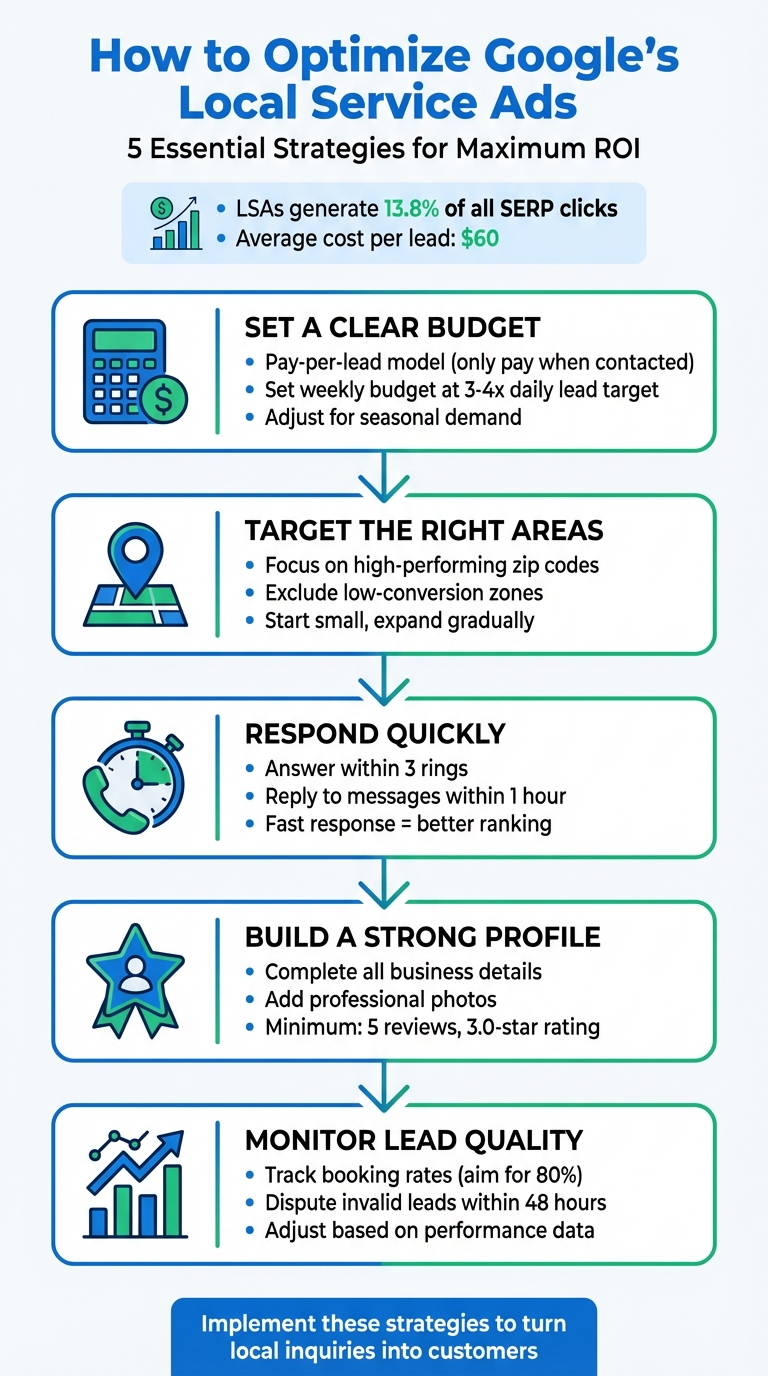
Importance of Accurate Business Information
Accurate business information forms the foundation of an effective Google Local Service Ads profile. This includes your business name, address, phone number, and operating hours. Consistency across platforms is crucial — discrepancies can lead to customer confusion and reduced trust. According to a 2024 survey, 73% of consumers are likely to visit a business with accurate information listed online. Make sure all details are up-to-date and reflect your current status.
Utilizing High-Quality Images
Visual content significantly influences customer engagement. High-quality images of your business, services, and team help create a positive first impression. A profile with professional images can increase click-through rates by up to 47%. Consider including a mix of interior and exterior photos, candid shots of your team in action, and images showcasing your services or products. Ensure that all images are well-lit and high-resolution to convey professionalism (this is often overlooked).
Highlighting Unique Selling Propositions
Clearly articulating your unique selling propositions (USPs) distinguishes your business from competitors. Identify what sets you apart — exceptional customer service, specialized expertise, or exclusive offers might be key. Highlight these USPs prominently within your profile. For example, if you have a satisfaction guarantee or specialized certifications, make these features easy to find. Effective communication of your USPs can enhance customer trust and increase conversion rates.
Incorporating Relevant Keywords
Keywords play a critical role in optimizing Google Local Service Ads. Research relevant keywords that potential customers might use to find services like yours. Incorporate these keywords naturally into your business description and service offerings. For instance, if you are a plumbing service in Phoenix, including phrases like “emergency plumbing services” or “affordable plumbing repairs” is essential. Well-optimized profiles can see a performance boost of up to 30% in local search visibility.
Nuance / Expert Layer
Many businesses overlook the importance of customer reviews in their profiles. Positive reviews not only enhance credibility — they also impact search rankings. Google considers the volume and quality of reviews as a ranking factor. Furthermore, businesses should respond to reviews — both positive and negative — to show engagement and commitment to customer satisfaction. This interaction can differentiate your business in a crowded market; 63% of consumers are more likely to use a business that responds to reviews.
Practical Application
- Audit your business information across all platforms for consistency.
- Invest in professional photography to enhance your image portfolio.
- Identify and articulate your unique selling propositions in your profile.
- Conduct keyword research and integrate relevant terms into your business description.
- Encourage satisfied customers to leave reviews and actively engage with feedback.
By implementing these strategies, businesses can effectively optimize their Google Local Service Ads. This can lead to increased visibility and the attraction of more customers.
Leveraging Customer Reviews for Optimization
Customer reviews are crucial for the success of Google Local Service Ads. Gathering and managing these reviews effectively can greatly impact consumer trust and ad visibility.
Strategies for Encouraging Customer Feedback
Encouraging customer feedback is vital for optimizing Google Local Service Ads. Several strategies can be beneficial:
- Post-Service Follow-Up: Send an email or text message to thank customers for their business and invite them to leave a review.
- Incentives: Offering small discounts or freebies can motivate customers to submit a review.
- Make It Easy: Providing direct links to review platforms simplifies the process for customers (this is often overlooked).
Responding to Reviews Professionally
Engaging with customers through reviews is essential. Professional responses can significantly enhance brand image:
- Timeliness: Respond promptly to both positive and negative reviews.
- Personalization: Address customers by name and reference specific details from their feedback.
- Constructive Tone: Always maintain a respectful and constructive tone, especially when addressing criticism.
Using Reviews to Build Trust and Credibility
Customer reviews act as social proof, playing a crucial role in influencing potential clients’ decisions. A 2024 survey shows that 84% of consumers trust online reviews just as much as personal recommendations. Positive reviews boost credibility. They encourage new customers to engage with your services.
Highlighting customer satisfaction through reviews not only improves ad performance but also strengthens brand loyalty. Ads featuring high ratings can lead to a 25% increase in click-through rates — showcasing these endorsements effectively is key.
Incorporating Reviews into Ad Copy
Integrating customer reviews into ad copy can amplify their impact. Here are a few effective approaches:
- Quotations: Include impactful snippets from customer reviews as testimonials in your ad copy.
- Star Ratings: Display average star ratings prominently to catch attention.
- Highlight Achievements: Mention any awards or recognitions earned based on customer feedback.
Nuance / Expert Layer
It’s a common misconception that only positive reviews matter for optimization. A balanced review profile—featuring both positive and negative feedback—can enhance authenticity and customer trust. Negative reviews, when handled professionally, can reflect a business’s commitment to customer service and improvement. In fact, 70% of consumers see a business’s response to negative reviews as a positive sign of customer care. Thus, managing both types of feedback is crucial for a comprehensive optimization strategy.
Practical Application
To leverage customer reviews effectively for optimizing Google Local Service Ads, consider these actionable steps:
1. Implement a follow-up system to request reviews after service completion.
2. Create a dedicated review page on your website with links to various platforms.
3. Develop a response strategy for addressing reviews promptly and professionally.
4. Regularly update ad copy to include recent positive reviews and high ratings.
By actively managing customer feedback, businesses can significantly enhance their local service ads. This ultimately drives higher engagement and conversion rates.
Understanding the Local Market Dynamics
This section explores critical aspects of local market dynamics that influence optimization strategies for Google Local Service Ads. A thorough analysis of competitors, demographics, and regional trends is essential. Businesses can then tailor their advertising approaches for maximum effectiveness.
Researching Local Competitors
Analyzing local competitors offers valuable insights into effective advertising strategies. Identify the top local players. Understanding their ad placements, service offerings, and customer engagement tactics can inform your approach. Tools like SEMrush and Ahrefs can be used to assess competitor keywords and ad performance.
- Identify the top three competitors in your market.
- Examine their ad copy, service highlights, and customer reviews.
- Track their promotional strategies and seasonal adjustments.
Identifying Target Customer Demographics
Understanding the demographics of your local market is crucial for crafting relevant ads. Analyze factors like age, gender, income levels, and geographical distribution. According to the U.S. Census Bureau, over 50% of consumers prefer to support local businesses — making targeted messaging imperative.
- Use tools like Google Analytics to gather demographic data.
- Segment your audience based on preferences and behaviors.
- Adjust your ad messaging to resonate with specific demographic groups.
Adapting Strategies Based on Local Trends
Local trends can significantly shape customer behavior and preferences. Keeping an eye on seasonal fluctuations, local events, and economic conditions can help tailor ad strategies effectively. For instance, a 2024 survey indicated that 67% of consumers are more likely to engage with ads reflecting current local trends.
- Monitor local news and social media for emerging trends.
- Adjust service offerings or promotions to align with local events.
- Use seasonal keywords in your ads to enhance relevance.
Using Local Keywords Effectively
Incorporating local keywords into your Google Local Service Ads is crucial for boosting visibility. Focus on keywords that include your service and location — these are likely the terms potential customers search for. For example, a plumbing service in Houston should use phrases like “Houston plumbing services” or “emergency plumber in Houston.”
Google’s Keyword Planner tool can assist in identifying high-traffic local keywords. Aim for a mix of short-tail and long-tail keywords to cover various search intents.
While many articles highlight basic keyword strategies, few emphasize the importance of **keyword intent**. Understanding whether customers are searching for immediate service, comparative information, or pricing can refine keyword selection and ad copy. For example, a potential customer searching for “best HVAC services near me” is likely in a different stage of the buying cycle than someone searching for “HVAC service prices.” Tailoring ads to this intent can significantly enhance engagement rates.
To implement this information effectively, businesses should begin with a competitive analysis to benchmark against local rivals—using demographic insights to refine the target audience. Implement a local keyword strategy that aligns with identified trends and customer preferences. Regularly update ad copy to reflect seasonal changes and local events (this is often overlooked), ensuring that ads remain relevant and engaging. Consistent monitoring and adjustment of strategies based on performance analytics will further enhance the effectiveness of Google Local Service Ads.
Monitoring and Analyzing Ad Performance
Effective monitoring and analysis of Google Local Service Ads are crucial for maximizing their impact. Leveraging analytics tools and tracking conversions allows businesses to refine their strategies continually. This enhances performance over time.
Utilizing Google Ads Analytics Tools
Google Ads provides a suite of analytics tools that yield insights into ad performance. These tools assist advertisers in understanding user engagement, click-through rates (CTR), and conversion metrics. Key features include:
- Performance Reports: These reports detail how ads perform across various parameters such as clicks, impressions, and average cost per lead.
- Audience Insights: This feature allows businesses to analyze demographic data — helping to tailor ads to specific customer segments.
- Ad Scheduling: Adjusting ad visibility based on peak performance times can optimize lead generation.
Setting Up Conversion Tracking
Conversion tracking is vital for measuring the success of Local Service Ads. Setting it up means defining what counts as a conversion, whether it’s a phone call, a booked appointment, or a form submission. The steps to establish conversion tracking include:
- Access the Google Ads dashboard and go to the ‘Tools’ section.
- Select ‘Conversions’ and click the ‘+’ button to add a new conversion action.
- Choose the type of conversion to track and input the relevant details.
- Implement the necessary tracking code on the website or app.
Identifying Key Performance Indicators (KPIs)
Establishing KPIs is essential for understanding how effective Local Service Ads are. Crucial KPIs to monitor include:
- Cost per Lead (CPL): This metric indicates the average cost of acquiring a lead through ads.
- Click-Through Rate (CTR): A higher CTR often signifies effective ad copy and targeting.
- Lead Quality: Evaluating the quality of leads generated (this is often overlooked) helps in determining the return on investment.
Making Data-Driven Adjustments
Data analysis should prompt actionable adjustments in ad strategy. For instance, if certain keywords or demographics yield higher conversion rates, reallocating the budget toward these areas can improve overall performance. Consider the following strategies:
- Regularly review performance metrics to identify trends and anomalies.
- A/B test different ad copies or targeting options to optimize engagement.
- Adjust bidding strategies based on performance data to maximize ROI.
As of 2024, businesses leveraging robust data analytics have reported a 30% increase in lead generation efficiency. This underscores the importance of continuous performance monitoring.
Common misconceptions include the belief that once ads are set up, no further action is needed. In reality, ongoing analysis and adjustment are critical for maintaining performance over time. Many overlook the potential of A/B testing. It can reveal significant insights into customer preferences and behaviors, leading to better-targeted advertising efforts.
To effectively apply these insights, businesses should implement a routine schedule for monitoring ad performance. This includes weekly reviews of conversion data, monthly performance reports, and quarterly strategy adjustments. Use the Google Ads analytics tools to assess ads regularly — making sure the insights gained lead to tangible improvements in campaign execution.
Local Strategies for Optimizing Google Local Service Ads
Understanding the intricacies of geographic and local market dynamics is essential for optimizing Google Local Service Ads. With 46% of all Google searches focused on local information, adjusting ad strategies to align with local factors can greatly improve visibility and conversion rates.
Geographic Market Differences
In bustling urban centers like San Francisco or New York City, businesses encounter higher bidding costs and stiff competition for visibility. In smaller towns or rural areas, however, the cost-per-lead tends to be lower. Still, businesses must make sure their ads connect with local culture and needs. Local nuances often determine which services are highlighted in ads — local market research is key.
Local Business Applications
Local businesses can effectively leverage Google Local Service Ads by emphasizing their unique strengths. Here are some specific applications:
- Service Area Targeting: Plumbers in Chicago can pinpoint neighborhoods to better reach local customers.
- Customer Reviews: A local electrician in Austin should use positive customer feedback to boost ad performance.
- Promotion of Local Offers: Restaurants in Seattle can showcase limited-time offers to draw in nearby diners.
- Instant Lead Generation: Home cleaning services in Miami can receive direct inquiries from local homeowners through ads.
Local Search and Visibility Impact
Optimizing Google Local Service Ads has a direct effect on local search rankings and visibility. To take full advantage of this, businesses should:
- Confirm that their Google Business Profile is fully optimized with accurate information and high-quality images.
- Encourage satisfied customers to leave positive reviews, as these can significantly influence ad performance.
- Use local keywords in ad copy that resonate with the community.
- Regularly monitor and tweak budget allocations based on performance metrics specific to local markets.
Pricing and Cost in Local Markets
Costs for Google Local Service Ads can vary widely by geographic market. For instance, service providers in metropolitan areas like Los Angeles often face higher average costs per lead, typically ranging from $20 to $60. In contrast, businesses in less competitive regions might pay between $10 and $30. Local businesses should budget accordingly — adequate funds are necessary to effectively compete against national players who usually have larger advertising budgets.
Local Implementation Checklist:
- Research local competition and adjust bids as needed.
- Update your Google Business Profile with current service areas and offerings.
- Collect and emphasize customer reviews in your ads.
- Use local keywords in your ad copy.
- Monitor ad performance weekly to make necessary changes.
- Promote seasonal or localized offers to attract specific demographics.
- Engage with local community events to enhance brand visibility.
Frequently Asked Questions
What are Google Local Service Ads?
Google Local Service Ads are pay-per-lead advertisements that connect local businesses with potential customers searching for services in their area. These ads appear at the top of Google search results, showcasing your business and its offerings.
How do I set up Google Local Service Ads?
To set up Google Local Service Ads, create a Google Ads account and complete the onboarding process, which includes verifying your business and selecting the services you provide. Once approved, you can create your ad and start receiving leads.
What factors affect the performance of Local Service Ads?
Performance of Local Service Ads is influenced by factors such as ad relevance, customer reviews, and your business’s response rate to inquiries. Additionally, your budget and the competitiveness of your service area also play significant roles.
How can customer reviews impact Local Service Ads?
Customer reviews significantly impact Local Service Ads by enhancing your business’s credibility and visibility. Positive reviews can lead to higher rankings in search results and increased trust from potential customers.
What is the cost of Google Local Service Ads?
The cost of Google Local Service Ads operates on a pay-per-lead basis, meaning you only pay for leads generated through your ads. Prices vary depending on the industry and location, with costs typically ranging from $20 to $100 per lead.
How long does it take to see results from Local Service Ads?
Results from Google Local Service Ads can often be seen within days of launching your campaign. However, optimizing your ads and building a strong reputation may take longer for sustained performance.
What are the common mistakes to avoid with Local Service Ads?
Common mistakes include neglecting to update your service areas, failing to respond promptly to leads, and not monitoring ad performance. Additionally, overlooking the importance of customer reviews can hinder your overall effectiveness.
Final Thoughts on how to optimize google local service ads
To achieve maximum impact with Google Local Service Ads, businesses must prioritize a compelling profile and actively manage customer reviews while understanding local market dynamics. This holistic approach ensures that ads resonate with the target audience and drive higher engagement.
Immediately audit your business profile to ensure it is optimized with accurate information, appealing visuals, and strategic keywords that reflect local search intent.
Ready to take your local service ads to the next level? Consult a google ads expert today for tailored strategies that deliver results!
Effective optimization of Google Local Service Ads is not just a tactical move; it is a strategic necessity for businesses aiming to thrive in a competitive marketplace.