
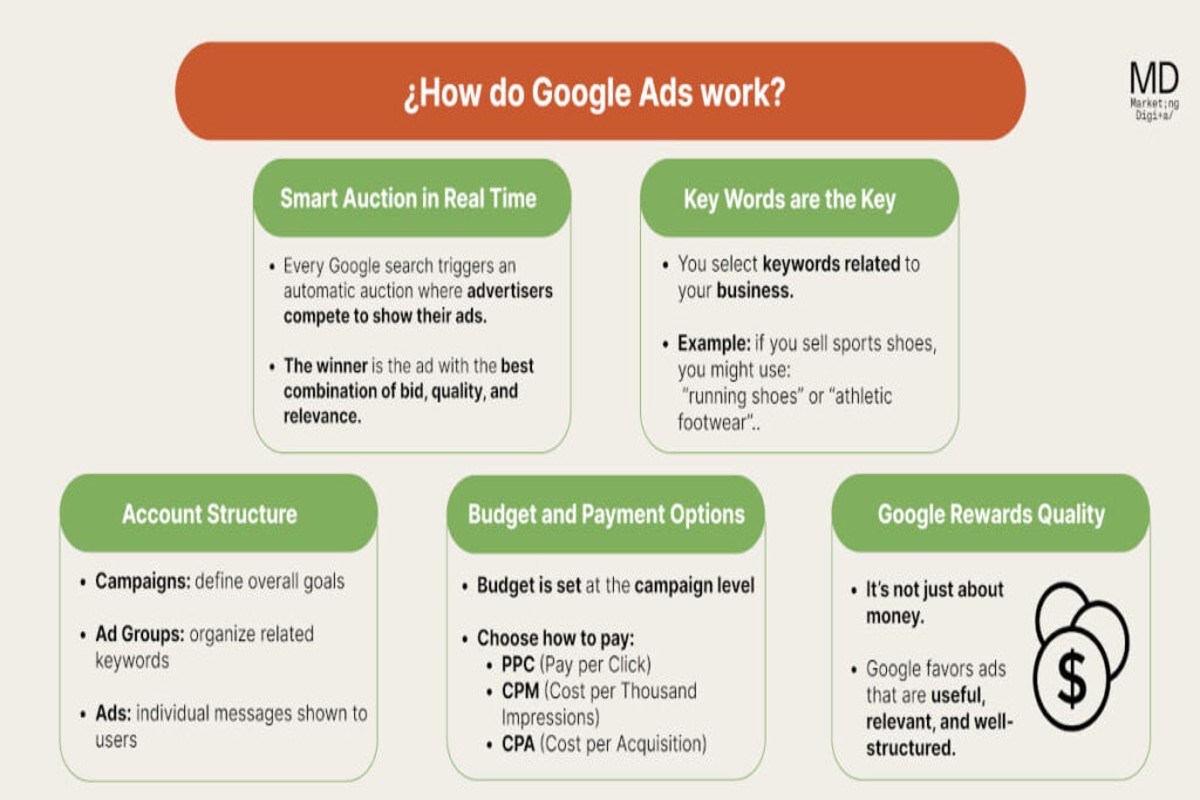
Google Ads provides control by enabling advertisers to customize targeting options, manage budgets, and monitor performance metrics in real-time. This level of control allows businesses to optimize their ad spending efficiently, ensuring they connect with the right audience at the right moment. In fact, advertisers can adjust their campaigns based on performance data, leading to an average return on investment (ROI) of $2 for every $1 spent.
Understanding how Google Ads provides control is crucial for businesses aiming to maximize their advertising effectiveness. With digital advertising expenditures projected to surpass $500 billion globally by 2024, mastering this platform is essential for staying competitive. Mismanagement or lack of knowledge can lead to ineffective campaigns and lost opportunities in an increasingly crowded marketplace.
Failure to grasp the control mechanisms within google ads can result in significant financial losses, wasted marketing resources, and a distinct competitive disadvantage. Advertisers who do not leverage these tools risk underperforming campaigns that fail to engage their target audience effectively.
This article will explore how Google Ads enables precise control over advertising campaigns, including a breakdown of targeting options, budget management strategies, and best practices for tracking performance. Readers will gain valuable insights into optimizing their campaigns for maximum impact.
What control features does Google Ads offer?
Google Ads offers a variety of control features that help advertisers manage their campaigns effectively. These features include options for targeting specific audiences, setting budgets, and scheduling ads to run at optimal times. Advertisers can adjust strategies based on performance metrics — this enhances overall campaign efficiency.
The targeting capabilities in Google Ads are extensive, enabling advertisers to reach specific demographics, geographic locations, and even interests. Advertisers can target by keywords, topics, or placements. This tailored approach aligns with their objectives. Additionally, Google Ads supports remarketing, which helps re-engage users who have previously interacted with a business (this is often overlooked).
Budgeting features in Google Ads are designed to provide flexibility and control over spending. Advertisers can set daily budgets, allocate funds to specific campaigns, and adjust bids based on performance. This control ensures advertisers can maximize their return on investment (ROI). The result is often significant — businesses using controlled budgeting strategies see up to a 30% increase in campaign performance efficiency.
- Ad Scheduling: Advertisers can specify when their ads should appear, allowing for optimal visibility during peak times.
- Performance Monitoring: Real-time analytics provide insights into ad performance, enabling quick adjustments to strategies.
- Creative Control: Advertisers can test different ad formats and creatives to see which resonates best with their audience.
Expert insight: Using the full range of control features in Google Ads can significantly enhance campaign outcomes. But continuous monitoring and adaptation are key to sustaining success.
How can I control my budget in Google Ads?
Controlling a budget in Google Ads is fairly simple — and it offers the flexibility needed to manage expenses effectively. Users can set both daily and monthly budgets. This allows for precise financial control over advertising campaigns. As of 2024, advertisers can allocate budgets as low as $1 per day. This makes it accessible for various business sizes.
To set your budget in Google Ads, follow these steps:
- Sign in to your Google Ads account. Then, navigate to the campaign you want to control the budget for.
- Select “Settings” from the menu. This option’s typically found on the left sidebar.
- Locate the “Budget” section. Here, you can choose to set either a daily budget or a shared budget across multiple campaigns.
- Click on “Edit” next to the budget amount. Enter your desired daily budget. This can be adjusted at any time based on campaign performance.
- For monthly budgets, calculate your total monthly spend by multiplying your daily budget by the average number of days in a month (approximately 30.4).
- Save your changes. Make sure you click the “Save” button to apply the new budget settings.
Additionally, Google Ads allows users to implement a “Maximize Conversions” bid strategy. This can further optimize spending by automatically adjusting bids to get the most conversions within the set budget. Be mindful — exceeding the daily budget on some days may happen. However, Google won’t exceed your total monthly budget.
Expert insight: Regularly review your campaign performance metrics. This helps adjust budgets dynamically, ensuring optimal return on investment (ROI). Setting alerts for budget thresholds can also enhance control over spending (this is often overlooked) and prevent overshooting your financial limits.
What targeting options are available in Google Ads?
Google Ads provides a variety of targeting options, including demographic, geographic, and keyword targeting. This allows advertisers to effectively reach specific audiences. Advertisers can choose from over 1,000 potential audience segments — tailoring their campaigns helps them connect with the most relevant users.
Demographic targeting lets advertisers specify characteristics like age, gender, parental status, and household income. For instance, a luxury car dealership might target individuals aged 30-55 with an income level in the top 20% to boost conversion likelihood. Geographic targeting zooms in on specific locations, whether countries or zip codes. This ensures ads reach users in desired areas. A local coffee shop, for example, could target ads within a 10-mile radius of its location to attract nearby customers.
Keyword targeting is one of the most important components. It allows advertisers to show ads based on search terms potential customers enter. A fitness center might bid on keywords like “gym membership” or “personal training near me.” This connects them with users actively searching for these services. Combining these targeting options effectively helps advertisers refine their campaigns. It also enables better budget allocation, often resulting in a higher return on investment (ROI).
Expert insight: Using a combination of targeting options can enhance campaign performance. For example, layering demographic targeting with keyword targeting can significantly refine audience reach and improve ad relevance.
How does Google Ads track campaign performance?
Google Ads tracks campaign performance using a mix of metrics, reporting tools, and features that offer real-time insights into advertising efforts. The platform provides detailed analytics, which help advertisers evaluate their campaigns’ effectiveness — including engagement rates, conversion rates, and return on ad spend (ROAS).
To track campaign performance effectively, Google Ads employs various tools and metrics. Here are the key steps involved:
- Google Ads Dashboard: The main interface gives a broad overview of campaign performance, showing critical metrics like impressions, clicks, and conversions in real-time.
- Conversion Tracking: This feature lets advertisers track specific actions users take after clicking ads, such as purchases or form submissions. Setting up conversion tracking reveals which ads drive valuable customer actions (this is often overlooked).
- Google Analytics Integration: Linking Google Ads with Google Analytics allows for deeper analysis of user behavior on landing pages. This integration helps identify traffic sources that yield the highest engagement and conversion rates — critical for informed decisions.
- Attribution Models: Google Ads provides different attribution models to analyze how multiple touchpoints contribute to conversions. This enables advertisers to allocate budgets more effectively across their marketing channels.
- Custom Reports: Advertisers can create tailored reports focusing on specific metrics relevant to their objectives. This flexibility supports targeted analysis and helps improve decision-making.
Each of these tools and features plays a vital role in understanding campaign performance. Make sure to leverage them effectively. By doing so, advertisers can optimize strategies and enhance return on investment.
Expert insight: Regularly reviewing performance metrics and adapting campaigns based on data-driven insights can greatly enhance overall advertising effectiveness. Consider A/B testing different ad formats and messages — this can lead to discovering the most effective combinations for your audience.
What are the benefits of using Google Ads for control?
Google Ads offers significant advantages for managing advertising campaigns — including flexibility, precision targeting, and data-driven decision-making. Advertisers can adjust budgets and target specific audiences. Analyzing performance metrics in real time helps optimize campaigns effectively.
The flexibility of Google Ads lets advertisers modify strategies based on immediate feedback. For example, daily spending limits can be increased or decreased. It’s possible to pause underperforming ads or shift target demographics. This adaptability is crucial for responding to market changes or seasonal trends. This way, campaigns stay relevant and effective.
Moreover, Google Ads provides robust analytics and reporting features that empower advertisers to make informed decisions. Access to metrics such as click-through rates (CTR), conversion rates, and return on ad spend (ROAS) allows businesses to assess campaign effectiveness. According to recent data, advertisers using Google Ads reported a 30% increase in ROI when employing its advanced reporting tools. This data-driven approach facilitates continuous improvement — allowing advertisers to allocate resources more efficiently.
Expert insight: Regularly reviewing campaign performance and making data-informed adjustments can significantly enhance the effectiveness of advertising efforts within Google Ads (this is often overlooked).
How can I optimize my Google Ads campaigns for better control?
To optimize Google Ads campaigns for better control, focus on precise targeting, budget management, and performance monitoring. Implementing these strategies can lead to improved ad relevance and cost efficiency. The result is often a significant increase in ROI — by up to 30%, according to industry studies conducted in 2024.
Effective campaign control is achieved through a strategic approach. Start by refining your audience targeting. Use demographic targeting, custom audiences, and remarketing lists to reach users who are more likely to convert. This ensures that your ads reach the most relevant audience. Engagement increases, and wasted ad spend decreases.
- Implement negative keywords: Regularly review your search terms report, and add negative keywords. Doing this can prevent your ads from showing on irrelevant queries. It often leads to enhanced click-through rates (CTR) and improved overall campaign performance.
- Set a clear budget strategy: Use daily and monthly budget caps to maintain control over spending. Consider using automated bidding strategies like Target CPA or Target ROAS — these adjust bids in real-time to maximize conversions within your budget.
- Utilize ad scheduling: Analyze performance data to determine when your ads perform best. Schedule your ads to run during peak times. This can enhance visibility and increase conversion rates while controlling costs (worth double-checking).
- Monitor and adjust regularly: Continuously track key performance indicators (KPIs) such as CTR, conversion rate, and cost per acquisition (CPA). Make data-driven adjustments to your campaigns based on performance trends. This is crucial for optimizing results.
Expert insight: Regularly testing ad copy and landing pages can lead to significant performance improvements. A/B testing can reveal which elements resonate best with your audience. This allows for continual refinement and greater control over campaign outcomes — a key factor in long-term success.
Understanding Google Ads Control Features
This section outlines the specific features within Google Ads that allow advertisers to take control of their campaigns. Understanding these capabilities is crucial for optimizing performance and achieving advertising goals.

Targeting Options
Google Ads provides robust targeting options that help advertisers reach their desired audience effectively. These options include:
- Keywords: Advertisers can choose specific keywords that trigger their ads. This ensures relevance and can enhance click-through rates. Targeting high-intent keywords can lead to a 50% increase in conversions.
- Demographics: Advertisers can narrow their audience based on factors like age, gender, and household income. This granularity allows for tailored messaging that resonates with specific groups (this is often overlooked).
- Locations: Geographic targeting enables businesses to concentrate their advertising efforts on specific regions, cities, or even a radius around a location. This greatly increases local engagement.
Budget Control Features
Google Ads offers comprehensive budget control mechanisms to help advertisers manage their spending effectively:
- Daily Budgets: Advertisers can set daily spending limits for each campaign. This allows for predictable costs and better cash flow management.
- Shared Budgets: This feature enables multiple campaigns to share a single budget, optimizing resource allocation based on performance metrics. Experts advise using this approach to enhance efficiency.
According to recent data, advertisers who use shared budgets have experienced a 20% increase in overall campaign efficiency.
Ad Scheduling and Delivery Methods
Ad scheduling lets advertisers decide when their ads will appear, enhancing control over campaign visibility. Key components include:
- Ad Scheduling: Advertisers can specify days and times for ads to run. This aligns campaigns with peak audience engagement periods — which is critical for maximizing impact.
- Delivery Methods: Options include standard delivery, which spreads ad spend throughout the day, and accelerated delivery, which shows ads more quickly until the budget is exhausted.
Performance Tracking Tools and Metrics
Performance tracking is essential for evaluating the effectiveness of campaigns. Google Ads offers a range of tools and metrics, including:
- Conversion Tracking: This allows advertisers to measure user actions after clicking on ads, such as purchases or sign-ups.
- Google Analytics Integration: This provides deeper insights into user behavior on websites, linking ad performance to overall site metrics (worth double-checking).
- Key Performance Indicators (KPIs): Metrics such as Click-Through Rate (CTR), Cost Per Click (CPC), and Return on Ad Spend (ROAS) help gauge campaign success.
In 2024, businesses leveraging advanced performance tracking saw an average ROAS improvement of 30%.
While Google Ads control features are straightforward, misconceptions can arise regarding their complexity. For example, many advertisers think that a larger budget automatically improves performance. However, effective targeting and strategic bidding are equally, if not more, crucial. Additionally, not fully utilizing ad scheduling can lead to wasted impressions during off-peak times.
To maximize control over campaigns, make sure to regularly review and adjust targeting options based on performance data. Implementing shared budgets can enhance resource allocation. Performance tracking tools should be employed continually to refine strategies. Establish clear objectives, allocate sufficient time for analysis, and adjust campaigns dynamically to align with changing market conditions.
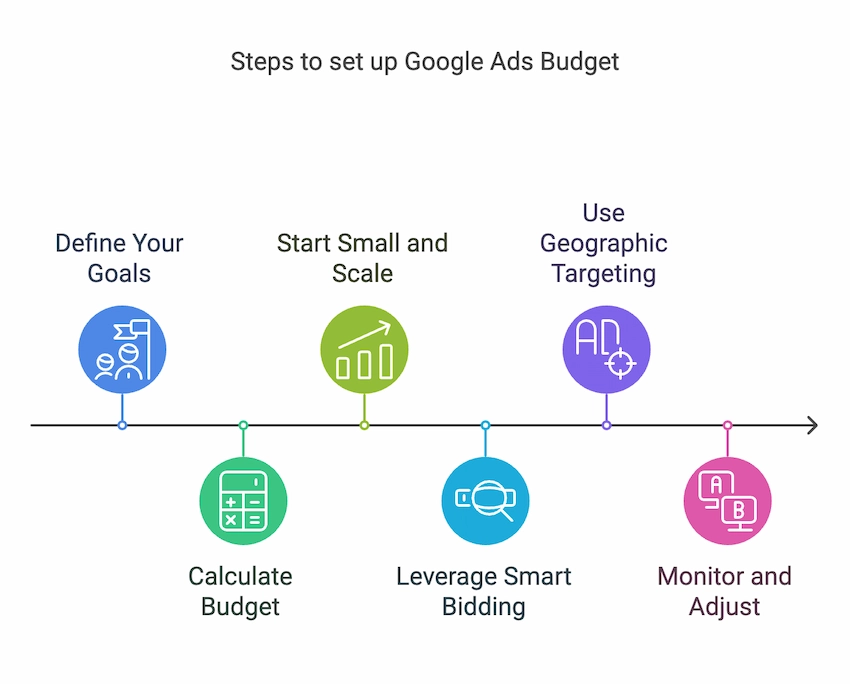
Step-by-Step Guide to Managing Your Google Ads Budget
This section outlines effective strategies for managing Google Ads budgets. Precise budget control is crucial for maximizing campaign performance and achieving advertising goals.
Setting Up Daily and Monthly Budgets
Establishing daily and monthly budgets is fundamental for controlling advertising spend. Daily budgets set the max amount spent each day. Monthly budgets, on the other hand, offer a broader financial framework for the campaign. Advertisers can set these budgets in the campaign settings — make sure they align with overall marketing objectives.
- Daily Budget: This is the maximum spend for each day, providing flexibility for fluctuations in ad performance.
- Monthly Budget: This is the total spend limit for the month, ensuring long-term financial planning.
- Adjustments: Both budgets can be modified based on seasonal trends or specific marketing pushes.
Using Bid Strategies to Control Costs
Bid strategies are essential tools for managing costs effectively. Google Ads offers various bidding options. These include Manual CPC, Target CPA, and Target ROAS, allowing advertisers to customize their approach based on objectives.
- Manual CPC: Gives advertisers control over individual bids, suitable for those optimizing specific keywords.
- Target CPA: Automatically sets bids to meet a specified cost per acquisition; ideal for conversion-focused campaigns.
- Target ROAS: Aims to maximize revenue based on a target return on ad spend — beneficial for e-commerce businesses.
Adjusting Budgets Based on Performance Data
Performance data is critical for budget adjustments. Advertisers should analyze metrics regularly, such as click-through rates (CTR), conversion rates, and cost per click (CPC), to gauge the effectiveness of their spend. Studies show that campaigns adjusting budgets based on performance data can see up to a 30% increase in ROI.
- Monitor key performance indicators (KPIs) regularly.
- Identify high-performing campaigns and allocate additional budget as necessary.
- Reduce budgets for underperforming ads to optimize overall spend.
Understanding the Impact of Budget Changes on Ad Visibility
Budget modifications directly influence ad visibility. Increasing budgets can enhance ad placements, but reductions may limit reach. Advertisers must recognize that a sudden budget decrease could result in fewer ad impressions and clicks. A gradual adjustment is advised to maintain visibility — without sacrificing performance. For instance, a 20% budget cut can lead to a 15-25% reduction in impressions, depending on keyword competition.
Many advertisers mistakenly assume that simply raising budgets will automatically improve performance. In reality, effective budget management requires a balanced approach that considers both budget size and campaign efficiency (this is often overlooked).
Practical Application
To manage a Google Ads budget effectively, follow these steps:
- Set clear daily and monthly budgets aligned with your marketing goals.
- Select appropriate bid strategies based on your campaign objectives.
- Regularly review performance data and adjust budgets accordingly.
- Monitor the impact of budget changes on ad visibility to ensure optimal performance.
Implementing these strategies helps ensure that advertising spend is controlled and effective, allowing advertisers to leverage how Google Ads provides control over their campaigns.
Best Practices for Optimizing Google Ads Control
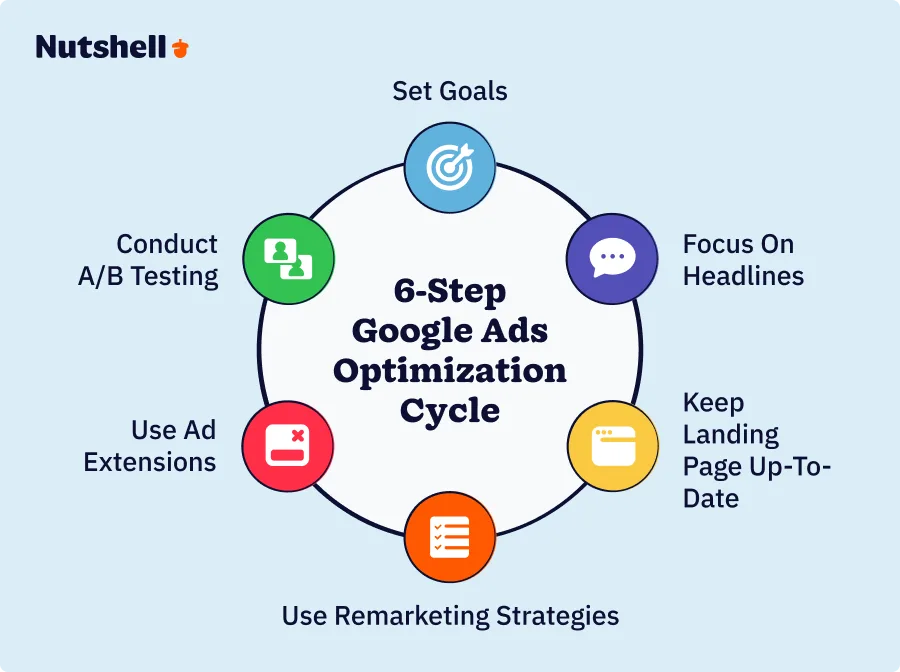
This section outlines best practices for enhancing control over Google Ads campaigns. Focused on actionable strategies, these practices can lead to improved performance and more effective budget management.
Regularly Reviewing and Adjusting Targeting Settings
Targeting settings are essential for reaching the right audience. Regular reviews help advertisers adapt to changes in market dynamics and consumer behavior. Key targeting options include:
- Geographic targeting: Adjust settings based on location performance.
- Demographic targeting: Refine audience characteristics like age, gender, and income level.
- Device targeting: Analyze engagement on mobile versus desktop — adjust bids accordingly.
Recent data shows that campaigns updating targeting settings regularly can see up to a 30% increase in engagement rates.
Utilizing A/B Testing for Ad Variations
A/B testing, or split testing, involves running multiple ad variations at the same time to identify which performs best. This practice promotes data-driven decisions regarding ad copy, visuals, and calls to action. Effective A/B testing steps include:
- Identify elements to test, such as headlines or images.
- Create two or more variations of the ad.
- Monitor performance metrics like click-through rate (CTR) and conversion rate.
Research indicates A/B testing can lead to a 20-50% improvement in campaign performance — making this a critical control tool.
Implementing Negative Keywords to Refine Targeting
Negative keywords prevent ads from being triggered by irrelevant search queries and optimize budget allocation. This strategy not only enhances relevance but also reduces wasted spend. Key steps for implementing negative keywords include:
- Conduct keyword research to identify non-converting terms.
- Regularly update the negative keyword list based on search term reports.
- Use match types to control how broadly negative keywords apply.
Effective use of negative keywords can lead to a 25% reduction in irrelevant clicks — improving overall campaign ROI.
Leveraging Reporting Tools for Informed Decision-Making
Google Ads offers robust reporting tools that provide insights into campaign performance. Using these tools guides strategic adjustments. Important aspects to consider include:
- Performance metrics: Focus on CTR, conversion rates, and cost per acquisition (CPA).
- Audience insights: Analyze demographic and geographic data to refine targeting (this is often overlooked).
- Attribution models: Understand which channels and touchpoints drive conversions.
Data-driven decision-making can result in a 15-25% increase in campaign efficiency — underscoring the value of these tools.
While these practices provide a solid foundation for control in Google Ads, many advertisers overlook the importance of holistic analysis. A common misconception is that focusing solely on individual metrics, like CTR, will yield optimal results. Instead, an integrated approach that considers all performance indicators leads to more nuanced insights and better strategic decisions. For example, an increase in CTR may not correlate with improved conversion rates if the audience isn’t adequately targeted. Understanding the interplay between metrics is vital for effective campaign management.
To apply these insights, advertisers should establish a routine for reviewing targeting settings, conduct A/B tests regularly, implement a dynamic negative keyword strategy, and utilize reporting tools comprehensively. Specifically, allocate time each week to analyze performance data, adjust campaigns as needed, and test new ad variations. These actions will enhance control over Google Ads campaigns and drive sustained performance improvements.
Common Mistakes to Avoid in Google Ads Control
Advertisers can elevate their Google Ads campaigns by recognizing and steering clear of common pitfalls. Identifying these mistakes is vital for optimizing performance and meeting campaign objectives.
Neglecting to Monitor Performance Metrics Regularly
Regularly monitoring performance metrics is critical for maintaining control over Google Ads campaigns. Many advertisers set their campaigns and then fail to review performance data. This oversight can lead to missed opportunities for optimization. Key metrics such as click-through rates (CTR), conversion rates, and return on ad spend (ROAS) should be reviewed at least weekly. According to recent studies, advertisers who actively monitor their campaigns can boost their CTR by up to 30%.
Setting Unrealistic Budgets or Bids
Establishing budgets and bids that don’t align with market conditions or campaign goals can significantly limit effectiveness. A budget that’s too low may lead to limited visibility. Conversely, an excessively high budget without a strategy can lead to wasted spend. Advertisers need to conduct market analysis to determine competitive bid ranges. For instance, in 2024, the average cost per click (CPC) in the retail sector is projected to be around $1.50 — this can serve as a solid benchmark for setting bids.
Failing to Update Targeting Settings Based on Market Changes
Targeting settings must be adjusted in response to evolving market conditions. Many advertisers make the mistake of setting their targeting parameters at the outset and then neglecting to revisit them. This can result in targeting an audience that’s no longer relevant. Regularly analyzing demographic data, geographic performance, and device usage can refine targeting strategies. As market dynamics shift — which they often do — updating these settings can significantly enhance campaign relevance and effectiveness.
Ignoring the Importance of Ad Relevance and Quality Score
Ad relevance is a vital component of Google Ads success. A high Quality Score can lead to lower costs per click and better ad placements. Advertisers often overlook this aspect, focusing solely on bids and budgets. To enhance ad relevance, it’s essential to align ad copy with the targeted keywords and user intent. In 2025, it’s estimated that ads with high relevance can achieve up to 50% lower CPCs compared to less relevant ads — certainly worth aiming for.
Nuance / Expert Layer
A common misconception is that increasing the budget directly correlates with improved campaign performance. However, without strategic adjustments to bidding, targeting, and ad relevance, simply raising spend can lead to diminishing returns. Not all metrics hold the same weight; emphasizing vanity metrics like impressions without considering engagement and conversion can mislead advertisers. Understanding the interplay between different metrics and their impact on overall campaign performance is essential for effective management.
Practical Application
To sidestep these common mistakes, advertisers should implement a systematic review process for their campaigns. This includes:
- Schedule weekly performance reviews to analyze key metrics.
- Benchmark bids against industry standards and adjust budgets accordingly.
- Regularly reassess targeting settings based on current market trends.
- Conduct A/B testing on ad copy to enhance relevance and improve Quality Scores.
By adopting these practices, advertisers can maintain control over their Google Ads campaigns and drive better results.
Frequently Asked Questions
What control features does Google Ads offer?
Google Ads provides various control features, including budget management, ad scheduling, and targeting options. Advertisers can customize their campaigns to meet specific goals and adjust settings based on performance data.
How can I control my budget in Google Ads?
Users can set daily budgets and choose between manual or automated bidding strategies in Google Ads. This allows advertisers to manage spending effectively while optimizing ad placements.
What targeting options are available in Google Ads?
Google Ads offers multiple targeting options, including keywords, demographics, location, and interests. Advertisers can refine their audience to enhance ad relevance and engagement.
How does Google Ads track campaign performance?
Google Ads tracks campaign performance through metrics such as impressions, clicks, and conversions. This data is accessible in the Google Ads dashboard, allowing for real-time analysis and adjustments.
What are the benefits of using Google Ads for control?
Using Google Ads provides control over ad spend, targeting, and performance tracking. Advertisers can quickly adapt strategies based on insights, maximizing return on investment.
How can I optimize my Google Ads campaigns for better control?
To optimize Google Ads campaigns, regularly analyze performance data and adjust targeting, keywords, and ad copy accordingly. Implementing A/B testing can also enhance control over campaign effectiveness.
Final Thoughts on how does google ads provide control
Google Ads empowers advertisers with unparalleled control over their campaigns, enabling precise budget management, targeted audience reach, and comprehensive performance tracking. This level of control is crucial for optimizing advertising strategies and ensuring maximum return on investment.
To leverage these capabilities effectively, advertisers should implement a robust testing framework that evaluates different targeting options and budget allocations, allowing for data-driven adjustments that enhance campaign performance.
Ready to take your campaigns to the next level? Consult with a google ads expert and gain the control you need for success!
Mastering the control features of Google Ads is essential for any business aiming to thrive in a competitive digital landscape, as it directly influences advertising success and overall growth potential.