

Google Ads is a powerful advertising platform that enables businesses to reach targeted audiences effectively. By leveraging over 3.5 billion daily searches, companies can significantly enhance their visibility and drive conversions, ultimately aligning their marketing strategies with specific business objectives.
Understanding how Google Ads can help you advance your business goals is crucial for any organization looking to thrive in a competitive landscape. With digital advertising spending projected to reach over $500 billion globally by 2024, businesses must grasp the intricacies of this platform to maximize their return on investment and reach their target customers effectively.
Failure to effectively utilize google ads can lead to substantial missed revenue opportunities, wasted marketing budgets, and a competitive disadvantage in an increasingly digital marketplace. Businesses that do not adapt risk falling behind their competitors who leverage targeted advertising to engage potential customers.
This article will explore how Google Ads can be integrated into your marketing strategy, including a comparison of top advertising providers, a breakdown of associated costs, best practices for campaign optimization, and insights on leveraging local SEO to enhance your reach.
What are the benefits of using Google Ads for businesses?
Google Ads offers businesses increased visibility, targeted reach, and measurable results—making it a potent tool for achieving business goals. In 2023, businesses using Google Ads saw an average return on investment (ROI) of $2 for every $1 spent. This highlights its effectiveness in driving sales and generating leads.
The primary advantage of Google Ads is its capacity to boost visibility. With billions of searches happening every day, businesses can position their ads at the top of search results. This ensures they’re seen by potential customers actively looking for their products or services. Increased visibility can lead to more website traffic and, ultimately, higher conversion rates.
Targeted reach is another significant benefit. Google Ads enables businesses to define their audience using various criteria, such as location, demographics, and user behavior. This precise targeting directs marketing efforts toward individuals most likely to convert—optimizing advertising spend and enhancing campaign effectiveness.
- Measurable results: Google Ads provides detailed analytics. Businesses can track performance metrics like clicks, impressions, and conversion rates in real-time.
- Flexible budgeting: Businesses can set daily budgets and adjust bids based on performance. This flexibility helps maintain control over advertising costs.
- Brand awareness: Even if users don’t click on ads, exposure in search results can enhance brand recognition and familiarity (this is often overlooked).
Expert insight: Regularly reviewing and optimizing Google Ads campaigns based on performance data can significantly boost effectiveness and ROI. Targeted A/B testing of ad copy and landing pages can further refine strategies and improve conversion rates—this effort is well worth the time invested.
How do I set up a Google Ads campaign?
To set up a Google Ads campaign, start by creating a Google Ads account and selecting a type of campaign that matches your business goals. Follow a structured approach to make sure all critical settings are configured correctly.
1. Create a Google Ads Account: Go to the Google Ads website and sign up for an account using your Google credentials. Provide accurate billing information—this avoids interruptions.
2. Select a Campaign Type: Choose from options like Search, Display, Shopping, or Video campaigns. Your choice should align with specific business objectives, such as driving website traffic or boosting brand awareness.
3. Define Your Campaign Goals: Set clear objectives, like sales, leads, or website traffic. Google Ads allows for a goal-oriented approach, which helps optimize the campaign effectively.
4. Choose Your Target Audience: Specify demographics, interests, and geographic locations. This targeting ensures your ads reach the most relevant audience — improving engagement and conversion rates.
5. Set Your Budget: Determine your daily or monthly budget. Google Ads works on a bidding system, so set a maximum cost-per-click (CPC) that fits your financial strategy.
6. Create Compelling Ads: Write clear, engaging ad copy that includes relevant keywords. Use strong calls-to-action (CTAs) to encourage user interaction.
7. Configure Ad Extensions: Enhance your ads with additional information through ad extensions, such as site links, call buttons, or location details. These features can improve click-through rates (this is often overlooked).
8. Review and Launch: Double-check all settings, targeting options, and ad creatives before launching your campaign. A thorough review can help prevent costly mistakes.
9. Monitor and Optimize: After launching, regularly analyze campaign performance using Google Ads analytics. Adjust bids, keywords, and ads based on performance data — it’s crucial for enhancing results.
Expert insight: Regularly A/B test your ad variations to determine what resonates best with your audience. This iterative process can significantly enhance your campaign’s effectiveness and ROI.
What is the average cost of Google Ads?
The average cost of Google Ads falls between $1 and $2 per click for most industries. However, costs can vary widely. In some competitive fields, advertisers might pay over $50 per click.
Google Ads mainly functions on a pay-per-click (PPC) model, meaning advertisers incur costs every time a user clicks on their ad. Several factors can influence the total cost of a Google Ads campaign, including:
- Industry Competition: Highly competitive sectors, like finance or legal services, usually face higher costs. This happens due to increased bids from advertisers.
- Quality Score: This metric assesses the relevance of ads, keywords, and landing pages. A good Quality Score can lower costs. A higher Quality Score usually leads to a lower CPC.
- Targeting Options: Geographic targeting, audience demographics, and specific keywords play a role in costs. Broader targeting often results in higher costs due to increased competition (this is often overlooked).
- Seasonality: Certain times of year, like holidays, often see more bidding activity. This can temporarily raise costs.
- Ad Format: Different types of ads, such as display ads or video ads, may come with varying costs associated with them.
Setting a budget is vital for managing campaigns effectively. Google Ads allows businesses to set daily and monthly budget limits. This helps control spending while still reaching the target audience. Regular monitoring and adjustments are important to optimize ad spend and achieve desired outcomes.
Expert insight: Businesses should carry out thorough keyword research and competitive analysis. This can help estimate potential costs accurately and allocate budgets effectively for maximum impact.
How can Google Ads improve my ROI?
Google Ads can significantly enhance return on investment (ROI) by enabling the creation of targeted campaigns that reach specific audiences. In fact, businesses using Google Ads often see an average ROI of $2 for every $1 spent — that translates to a 100% return.
Take, for instance, a local coffee shop investing $1,000 in a Google Ads campaign aimed at coffee enthusiasts within a 10-mile radius. By using geo-targeting and specific keywords like “best coffee near me,” the shop can draw in potential customers actively searching for coffee options. After running the campaign for one month, the shop tracks clicks and conversions. They find that 200 customers visited directly because of the ads, with each spending an average of $5. That results in $1,000 in revenue, effectively doubling their investment and showing a clear path to improved ROI.
Furthermore, Google Ads provides strong tracking tools that measure performance metrics, including click-through rates (CTR), conversion rates, and cost per acquisition (CPA). For example, if the same coffee shop spots that certain keywords produce a higher conversion rate, they can redirect more budget toward those specific ads. This data-driven strategy allows for ongoing optimization of campaigns — a crucial step that ensures funds are directed toward the most effective approaches, ultimately boosting overall profitability.
Expert insight: Regularly review and adjust your Google Ads campaigns based on performance metrics. This proactive approach can lead to sustained improvements in ROI over time (this is often overlooked).
What are the best practices for Google Ads?
Effective Google Ads campaigns depend on following best practices that boost performance and align with business goals. Implementing these strategies can lead to better click-through rates (CTR) — and a higher return on investment (ROI). Research shows that businesses using optimized Google Ads strategies can achieve ROI improvements of up to 200%.
To maximize the effectiveness of Google Ads campaigns, keep these best practices in mind:
- Conduct Thorough Keyword Research: Use tools like Google Keyword Planner to find relevant keywords with high search volume and low competition. Long-tail keywords are key—they often yield higher conversion rates.
- Optimize Ad Copy: Create compelling ad copy that contains targeted keywords, a clear value proposition, and a strong call to action (CTA). Don’t forget to test different variations of ad copy to see which works best for your audience.
- Utilize Ad Extensions: Add ad extensions such as site links, callouts, and structured snippets to offer more info and improve the visibility of your ads. Ads with extensions usually see a 10-15% higher CTR.
- Monitor and Adjust Bids: Analyze performance metrics regularly to adjust bids based on keyword and ad effectiveness. Automated bidding strategies can help optimize for conversions or target CPA — depending on your goals.
- Implement A/B Testing: Constantly test different elements of your campaigns, including landing pages, ad formats, and bidding strategies. This practice helps pinpoint the most effective combinations for driving conversions.
Expert insight: Regularly reviewing and refining Google Ads campaigns based on performance data is crucial. Consider using advanced features like audience targeting and remarketing (this is often overlooked) to reach users more effectively and maximize the advertising budget.
Understanding Google Ads: A Comprehensive Overview
This section offers an in-depth look at Google Ads. It covers its fundamental purpose, various campaign types, and how it fits into larger digital marketing strategies. A solid understanding of these concepts is essential for using Google Ads to effectively advance business goals.

Definition and Purpose of Google Ads
Google Ads is an online advertising platform created by Google, allowing businesses to display ads on Google’s search results pages and across its vast display network. The main goal is to connect advertisers with potential customers right when they are searching for relevant products or services. This targeted strategy increases visibility, drives traffic, and can significantly boost conversion rates.
Types of Google Ads Campaigns
Google Ads includes several campaign types, each aimed at different marketing objectives:
- Search Campaigns: Text-based ads that show up on Google search results when users search for specific keywords.
- Display Campaigns:
Visual ads that appear on websites within the google display Network, targeting users based on their interests and online activities.
- Video Campaigns: Ads displayed on YouTube and other video platforms, ideal for storytelling and engaging with the brand.
- Shopping Campaigns: Product listings that appear in search results, specifically crafted for e-commerce businesses to promote products directly.
- App Campaigns: Ads that promote mobile applications across Google’s platforms, including search, Play Store, and YouTube.
Integration into Digital Marketing Strategies
Google Ads serves a crucial role in broader digital marketing strategies. It provides immediate visibility and traffic, complementing SEO efforts. Plus, it offers valuable insights into keyword performance and user behavior. Importantly, Google Ads can be tied in with other digital marketing channels, like social media and email marketing, to create cohesive campaigns that enhance outreach and engagement (this is often overlooked).
Key Terminology and Metrics
Grasping specific terminology and metrics is vital for effectively managing Google Ads. Key terms include:
- CPC (Cost Per Click): The cost incurred for each click on an ad. The average CPC in 2024 is projected to be about $1.50 across different industries.
- CTR (Click-Through Rate): The ratio of users who click on an ad compared to the total number of users who view it. A typical CTR for search ads is around 3-5%.
- Quality Score: A metric that affects ad placement and CPC, determined by the relevance of ad content, keywords, and landing page experience.
- Impressions: The total number of times an ad is displayed, regardless of whether it’s clicked.
Nuance and Expert Layer
There’s a common misconception that higher bids always lead to better ad placements. While bid amounts do impact ad visibility, factors like ad relevance and Quality Score play significant roles. Furthermore, many businesses overlook the value of negative keywords, which help prevent ads from appearing for irrelevant queries — optimizing budget allocation. Understanding these nuances can lead to more effective campaign management and improved ROI.
Practical Application
To use Google Ads effectively, businesses should begin by defining clear goals and choosing the right campaign type to match those goals. Conduct thorough keyword research to find relevant search terms. Use negative keywords to refine targeting as needed. Regularly monitor key metrics such as CPC and CTR to evaluate performance, making adjustments as necessary to optimize ad spend and maximize results. Utilizing A/B testing for ad copy and landing pages can enhance effectiveness — ensuring continuous improvement of campaigns.
Creating Effective Google Ads Campaigns: A Step-by-Step Guide
This section lays out a structured approach for setting up and optimizing Google Ads campaigns, with an emphasis on key strategies that align with business objectives. A well-executed campaign can enhance visibility, drive traffic, and — ultimately — advance business goals.
Identifying Target Audiences and Setting Goals
Defining the target audience is a foundational step for any Google Ads campaign. Use demographic data, interests, and online behavior to create detailed buyer personas. Set clear, measurable goals — like increasing website traffic by 30% or generating 100 new leads monthly. Align these goals with overall business objectives to make sure campaigns effectively contribute to growth strategies.
Choosing the Right Keywords and Ad Formats
Keyword selection plays a crucial role in ad visibility and relevance. Conduct thorough keyword research using tools like Google Keyword Planner. This helps identify high-traffic keywords relevant to products or services. A mix of broad, phrase, and exact match keywords can capture various search intents effectively.
- Broad match keywords allow for extensive reach but might lead to less targeted traffic.
- Phrase match keywords strike a balance by targeting specific phrases while retaining some flexibility.
- Exact match keywords provide the highest relevance — but limit reach.
In addition to keywords, select the right ad formats like search ads, display ads, or video ads, based on where the audience spends their time. For example, video ads can enhance engagement, as a projected 82% of all consumer internet traffic will come from video by 2026.
Budgeting and Bidding Strategies
Establishing a budget is vital for managing Google Ads spend effectively. Determine the overall advertising budget and allocate it across campaigns based on their importance and expected ROI. Consider these bidding strategies:
- Manual CPC allows for direct control over bids.
- Enhanced CPC automatically adjusts bids to maximize conversions.
- Target CPA works to achieve conversions at a specified cost.
In 2024, average cost-per-click (CPC) rates are projected to range from $1 to $2 across most industries — emphasizing the need for thoughtful budget management.
Monitoring and Adjusting Campaigns for Better Performance
Continuous monitoring of campaign performance is essential for optimization. Use Google Ads reporting tools to analyze key metrics like click-through rates (CTR), conversion rates, and return on ad spend (ROAS). Regularly assess which keywords and ad formats deliver the best results; adjust campaigns accordingly. A/B testing different ad copies and formats can also reveal what resonates most with the audience.
Many marketers underestimate the importance of negative keywords, which can prevent ads from appearing for irrelevant searches. Regularly updating the negative keyword list can significantly improve ad targeting and efficiency.
Nuance / Expert Layer
Common misconceptions about Google Ads include the belief that higher spending always yields better results. In reality, effective targeting and ad relevance often lead to higher returns than mere budget increases. Understanding the competitive landscape is also vital; even with a limited budget, focusing on niche keywords in less competitive markets can yield substantial results. Surprisingly, many businesses overlook opportunities presented by local targeting — this can enhance foot traffic and local engagement considerably.
Practical Application
To implement these strategies, start by defining the audience and setting concrete goals. Conduct keyword research to develop a targeted list. Establish a realistic budget and choose a bidding strategy that aligns with objectives. Finally, monitor performance metrics regularly and adjust campaigns based on data-driven insights. By following this structured approach, businesses can effectively leverage Google Ads to advance their goals and achieve measurable success.
Analyzing Google Ads Performance: Tools and Metrics
Measuring the success of Google Ads campaigns is vital for reaching business objectives. This section dives into key metrics and tools that facilitate performance analysis. This ensures campaigns are optimized for maximum return on investment (ROI).
Key Metrics to Track
Tracking specific metrics reveals the effectiveness of Google Ads campaigns. Here are the crucial ones for assessing performance:
- Click-Through Rate (CTR): This metric shows the percentage of users who click on an ad after seeing it. A high CTR indicates the ad is relevant and engaging. The average CTR for search ads is about 3.17% as of 2024.
- Cost Per Click (CPC): CPC measures how much is spent for each click on an ad. Understanding CPC helps businesses manage their budgets effectively. The average CPC across various industries ranges from $1 to $2 for search ads (worth double-checking).
- Conversion Rate: This metric reflects the percentage of users who complete a desired action after clicking on an ad. A higher conversion rate signifies effective targeting and ad relevance. Average rates hover around 3.75% for e-commerce sites.
Using Google Analytics to Assess Performance
Google Analytics is a powerful tool for evaluating the success of Google Ads campaigns. By linking Google Ads with Google Analytics, businesses gain deeper insights into user behavior, allowing for:
- Tracking user engagement on landing pages.
- Identifying which ads drive the most conversions.
- Analyzing traffic sources to optimize ad spend.
Using Google Analytics not only helps in measuring campaign impact — it also aids in refining targeting strategies.
A/B Testing Ad Variations for Improvement
A/B testing, or split testing, compares two versions of an ad to determine which performs better. This involves:
- Creating two ad variations with one differing element (e.g., headlines, images, or calls to action).
- Running both ads simultaneously to a similar audience segment.
- Analyzing performance data to identify the more effective ad.
Effective A/B testing can lead to significant improvements in CTR and conversion rates. This allows for data-driven decision-making.
Adjusting Strategies Based on Data Insights
Data insights gathered from performance metrics and analytics should guide strategy adjustments. Common strategies include:
- Refining target demographics based on conversion data.
- Modifying ad copy to enhance engagement based on CTR analysis.
- Reallocating budget towards high-performing keywords or ad groups.
Regularly adjusting strategies makes sure campaigns align with changing market dynamics and business goals.
When analyzing Google Ads performance, it’s vital to recognize that metrics shouldn’t be viewed in isolation. For example, a high CTR may not always correlate with a high conversion rate if the landing page experience is lacking. Businesses should adopt a holistic approach to performance analysis — integrating multiple data points to inform comprehensive strategy adjustments.
To effectively apply these insights, businesses should set up a routine for monitoring key metrics, implement A/B testing for continuous improvement, and leverage Google Analytics for in-depth analysis. This proactive approach enables organizations to maximize the impact of their Google Ads campaigns, directly contributing to advancing their business goals.
Common Mistakes to Avoid in Google Ads
Effectively using Google Ads can significantly boost business performance. Still, many businesses fall into common traps that limit their success. Recognizing and avoiding these mistakes is essential for maximizing Google Ads’ potential to help achieve business objectives.
Neglecting Keyword Research and Targeting
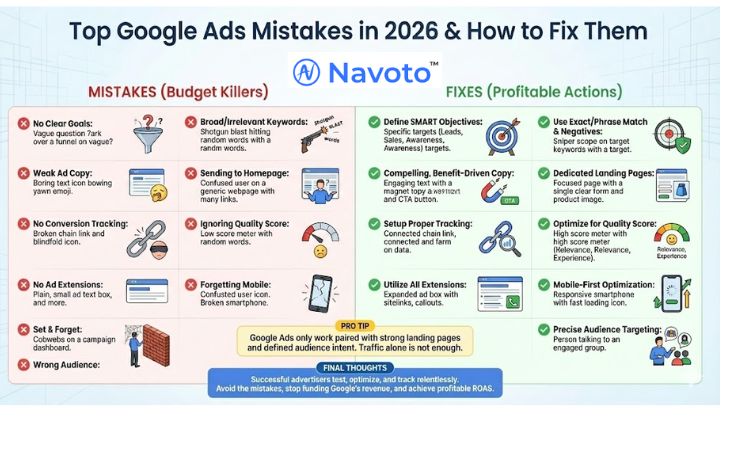
Keyword research forms the backbone of a successful Google Ads campaign. Too often, businesses overlook this critical step, leading to poorly targeted ads. Using tools like Google’s Keyword Planner can provide valuable insights into search volume and competition levels. According to a 2024 study, campaigns that conduct thorough keyword research see a 33% higher click-through rate than those that don’t — a significant difference for any campaign.
Ignoring Ad Copy Quality and Relevance
Ad copy acts as the first impression for potential customers. If it’s poorly written or irrelevant, it can lead to low engagement and wasted budgets. High-quality ads should be clear and compelling, directly tied to the targeted keywords. A/B testing various versions of ad copy can dramatically enhance performance; businesses that implement A/B testing report an average increase of 25% in conversion rates.
Failing to Monitor and Adjust Campaigns Regularly
Google Ads demands continuous management to achieve optimal performance. Many businesses set up their campaigns and then leave them unattended. This often means missing essential opportunities for improvement. Regularly reviewing metrics like click-through rates, conversion rates, and cost-per-click can highlight underperforming areas. In fact, campaigns that receive adjustments at least once a month can achieve 15% better results compared to those that are neglected.
Overlooking the Importance of Landing Page Optimization
The landing page is where conversions occur, so its optimization is crucial. A well-optimized landing page can dramatically enhance the effectiveness of Google Ads. Factors such as load speed, mobile responsiveness, and clear calls to action influence conversion rates. Research shows that landing pages with optimized user experiences can see conversion rates increase by up to 50%.
Nuance / Expert Layer
Common misconceptions about Google Ads include the notion that higher spending guarantees better results. However, efficiency in targeting and ad relevance often carry more weight than budget size. Furthermore, businesses frequently underestimate the importance of negative keywords; these can refine audience targeting significantly. Implementing negative keywords can lead to notable reductions in wasted ad spend — optimizing budget allocation and boosting campaign ROI (this is often overlooked).
Practical Application
To sidestep these pitfalls, businesses should adopt the following strategies:
- Conduct comprehensive keyword research using tools like Google’s Keyword Planner.
- Create engaging and relevant ad copy, and continuously A/B test variations.
- Regularly monitor campaign performance metrics and make adjustments.
- Optimize landing pages for speed, responsiveness, and user experience.
By addressing these common mistakes, businesses can utilize Google Ads more effectively — ultimately advancing their business goals.
Frequently Asked Questions
What are the benefits of using Google Ads for businesses?
Google Ads allows businesses to reach a targeted audience quickly and effectively. It provides measurable results, enabling companies to optimize their advertising strategies for better performance.
How do I set up a Google Ads campaign?
To set up a Google Ads campaign, create an account and select your campaign type. Then, define your target audience, budget, and ad content before launching the campaign.
What is the average cost of Google Ads?
The average cost of Google Ads varies widely based on industry and competition, typically ranging from $1 to $2 per click. Businesses can set daily budgets to control overall spending.
How can Google Ads improve my ROI?
Google Ads can improve ROI by targeting specific demographics and utilizing data-driven strategies to optimize ad performance. Continuous monitoring and adjustments can lead to higher conversion rates and lower costs per acquisition.
What are the best practices for Google Ads?
Best practices for Google Ads include conducting keyword research, writing compelling ad copy, and regularly analyzing campaign performance. Implementing A/B testing can also enhance ad effectiveness and maximize results.
Final Thoughts on how can google ads help you advance your business goals
Harnessing the power of Google Ads can significantly elevate your business performance by driving targeted traffic, enhancing brand visibility, and ultimately improving ROI. Its robust analytical tools allow for continuous optimization, ensuring campaigns align with evolving business objectives.
To maximize the potential of Google Ads, initiate a pilot campaign focused on a specific product or service, utilizing targeted keywords and demographic insights to refine your approach based on real-time data.
Ready to elevate your strategies? Consult a google ads expert today and discover how tailored advertising can help you achieve your business goals!
In an increasingly competitive digital landscape, leveraging Google Ads is not just an option; it is a strategic imperative for businesses aiming to achieve sustained growth and market relevance.