
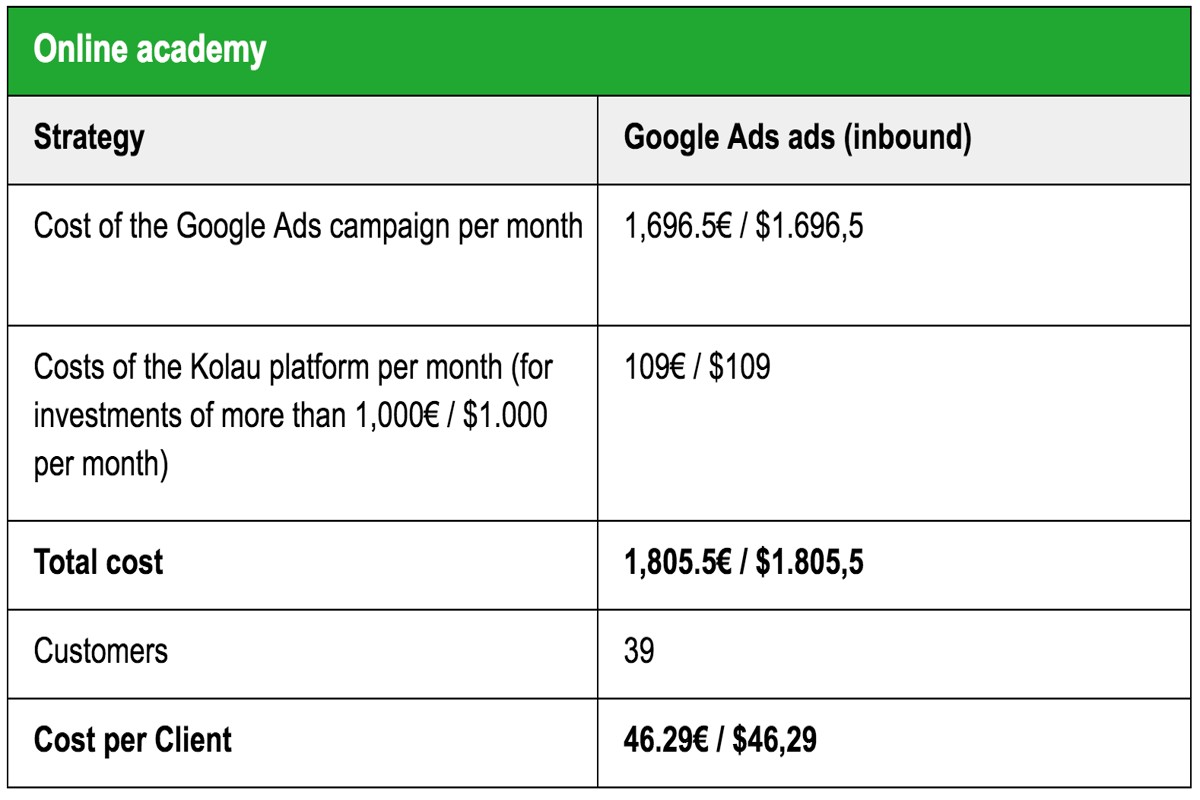
How much does Google Ads cost? Google Ads operates on a pay-per-click model, allowing advertisers to spend as little as $1 per click. However, costs vary significantly based on industry competition and specific targeting, making it essential for businesses to understand their unique cost landscape.
Understanding the costs associated with Google Ads is crucial for businesses aiming to maximize their online advertising effectiveness. With over 3.5 billion searches conducted daily, mastering Google Ads can lead to increased visibility and revenue. Companies that overlook these details risk overspending and missing out on valuable traffic, as competition for keywords can drastically influence pricing.
Failure to grasp the nuances of Google Ads costs can lead to substantial lost revenue and wasted marketing budgets. Businesses may struggle to achieve a positive return on investment, placing them at a competitive disadvantage in an increasingly digital marketplace.
This article will provide a comprehensive breakdown of Google Ads costs, including comparisons of top providers, detailed cost structures, best practices for optimizing ad spending, and insights into how local SEO factors into overall advertising strategies.
What is the average cost per click for Google Ads?
The average cost per click (CPC) for Google Ads varies significantly. Typically, it ranges from **$1 to $2** on the Search Network, but it can soar to over **$50** in highly competitive industries. Recent data from 2024 indicates the overall average CPC across all industries is approximately **$2.69**.
Several factors influence the cost of clicks on Google Ads. Industry competition plays a major role. For example, sectors like legal services and finance often have higher CPCs—this is due to the competitive nature of the keywords involved. In contrast, other fields like retail or e-commerce generally see lower costs. Geographic targeting can also impact CPC; urban regions usually experience higher bids than rural areas (this is often overlooked).
- Keyword Competition: Highly sought-after keywords naturally incur higher costs. When businesses compete for the same keywords, the CPC will go up.
- Quality Score:
Google assesses ad relevance, landing page quality, and expected click-through rate. A higher Quality Score can lead to a lower CPC.
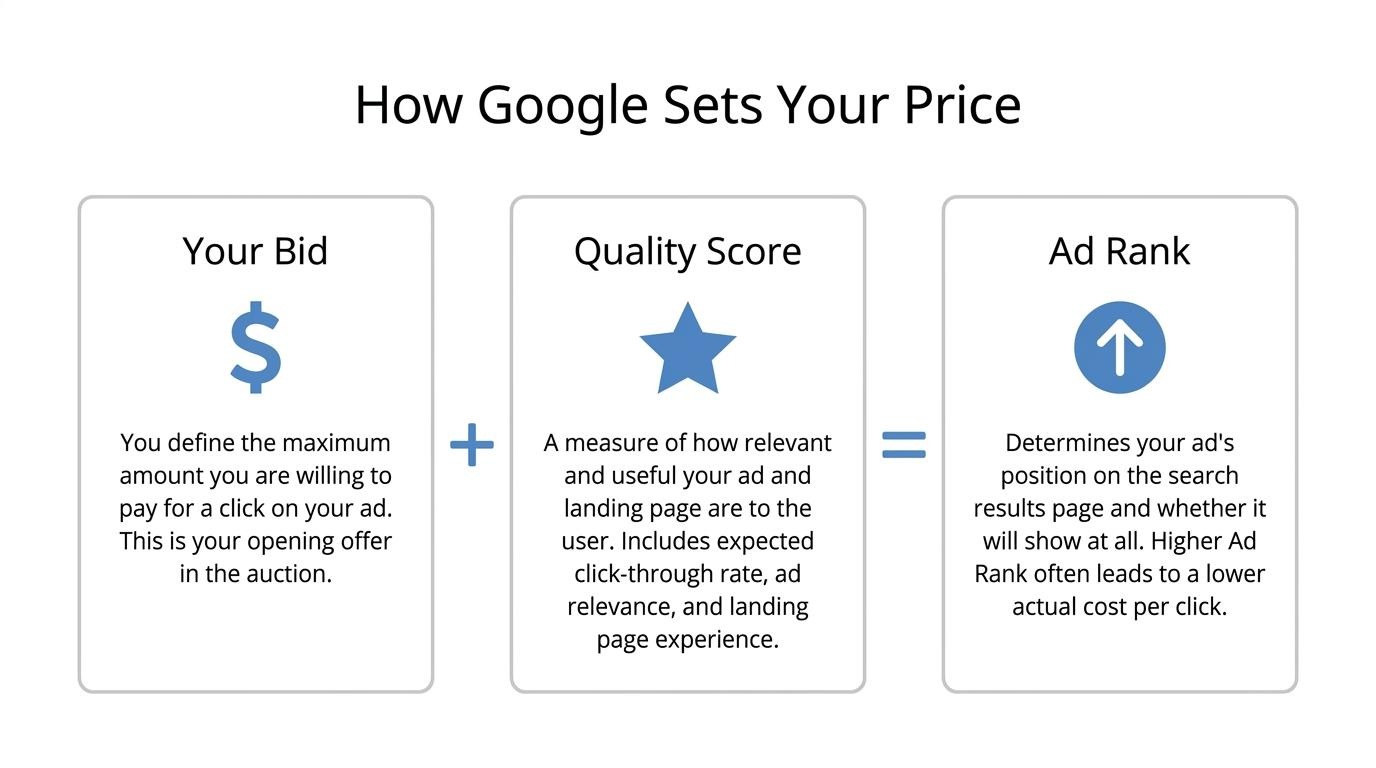
- Ad Rank: This metric is determined by bid amount and Quality Score. A higher Ad Rank can result in better placement at a lower CPC.
- Time of Year: Seasonal trends and events can significantly affect CPC. For instance, holiday shopping seasons often see increased ad spending—and thus higher CPCs.
Expert insight: To optimize Google Ads spending, focus on improving the Quality Score. This means using relevant ad content and effective landing pages. Doing so can significantly reduce overall CPC while enhancing ad performance.
How can I calculate my Google Ads budget?
Calculating a Google Ads budget requires setting clear marketing goals and figuring out how much you’re willing to spend to reach them. A typical starting budget can be anywhere from $500 to several thousand dollars each month, depending on the industry and specific objectives.
Follow these steps to effectively calculate your Google Ads budget:
- Define Your Goals: Pinpoint what you want your ads to accomplish. Common goals include increasing website traffic, generating leads, or boosting sales. Having clear objectives will help guide where to allocate your budget.
- Research Costs: Look into the average cost-per-click (CPC) for your industry. For instance, in 2024, the average CPC across all industries is around $2.69. Understanding your industry’s CPC is crucial — it helps in estimating how much you’ll spend based on your goals.
- Calculate Daily Budget: Calculate your daily budget by dividing your overall monthly budget by the number of days in that month. For example, if your monthly budget is $1,500, your daily budget would come to $50.
- Estimate Clicks: Figure out how many clicks you might get by dividing your daily budget by the average CPC. Using the earlier example, if your CPC is $2.69, you could expect around 18 clicks per day ($50 ÷ $2.69).
- Adjust Based on Performance: Keep an eye on how your ads are performing. If certain campaigns bring in high returns, think about reallocating funds or increasing your budget to make the most of those successful strategies.
By following these steps, businesses can establish a structured approach to budgeting for Google Ads that aligns with their marketing objectives — and ensures effective resource allocation.
Expert insight: Regularly reviewing and adjusting your budget based on real-time performance data can significantly enhance your ad campaign’s effectiveness. This ensures you invest in the most profitable opportunities (this is often overlooked).
What factors influence the cost of Google Ads?
The cost of Google Ads is shaped by several key factors. These include industry competition, the specific industry itself, and the selected targeting options. Advertisers can pay anywhere from $1 to over $50 per click — all depending on these variables.
Competition significantly impacts Google Ads costs. In highly competitive industries, like legal services or finance, the cost-per-click (CPC) tends to be higher. This is due to the demand for limited ad space. On the flip side, industries with lower competition, such as niche markets, usually have lower CPCs. For instance, averages in the legal sector can surpass $50, while less competitive sectors might range from $1 to $2.
The specific industry also dictates costs. Some industries naturally have higher customer lifetime values — which justifies higher advertising expenses. Seasonal trends can also affect costs; retail ads, for example, may spike in price during peak shopping seasons. Additionally, targeting options, like geographic location, demographics, and device types, play a role in shaping pricing. More precise targeting typically results in higher costs, thanks to the increased likelihood of conversions (this is often overlooked).
- Competition: High competition increases costs; low competition lowers them.
- Industry: Industries like legal and finance are pricier than niche markets.
- Targeting: More specific targeting options raise costs due to higher conversion potential.
Expert insight: To optimize Google Ads spend, focus on refining targeting and exploring less competitive keywords. This can lead to lower costs while still maintaining effective ad visibility.
Is Google Ads worth the cost?
Yes, Google Ads can be worth the cost, especially with strategic management. Businesses often see an average return of $2 for every $1 spent on Google Ads. This can make it a profitable investment.
The value of Google Ads largely hinges on several factors, including industry competition, target audience, and campaign optimization. For instance, businesses in high-demand sectors may deal with higher costs per click (CPC) but also enjoy greater conversion rates. Understanding your market is crucial—industries like legal services or insurance often see higher CPCs, sometimes exceeding $50. However, the potential revenue from a single client can easily justify this expense.
Additionally, the effectiveness of Google Ads can greatly improve through careful targeting and keyword selection. Tools like the Google Keyword Planner are invaluable for pinpointing both high-traffic and cost-effective keywords. A well-optimized campaign can lead to lower CPCs and higher click-through rates (CTR) — ultimately maximizing ROI. Businesses ought to continually analyze their performance metrics. Adjusting bids and targeting strategies can enhance campaign effectiveness (this is often overlooked).
Expert insight: To maximize the value of Google Ads, businesses should set aside a portion of their budget for A/B testing ad copies and landing pages. This can reveal the most effective strategies, ensuring that advertising spend results in real, tangible outcomes.
What are the different pricing models for Google Ads?
Google Ads provides several pricing models, including Cost-Per-Click (CPC), Cost-Per-Thousand Impressions (CPM), and Cost-Per-Acquisition (CPA). Each model serves different advertising goals: driving traffic, raising brand awareness, or generating conversions. In 2024, average CPC rates may fall between $1 and $2 for search ads, influenced by the industry and competition.
The Cost-Per-Click (CPC) model charges advertisers every time a user clicks on their ad. This model is often favored for search campaigns aimed at driving traffic to a website. Advertisers specify a maximum bid they’re willing to pay per click — Google then uses an auction system to decide which ads appear and their order. In competitive sectors, CPC can climb significantly, sometimes going over $50 per click.
The Cost-Per-Thousand Impressions (CPM) model primarily applies to display campaigns, where advertisers pay for every thousand impressions their ad receives, regardless of whether it gets clicked. This model works best for brand awareness efforts, letting businesses reach a wide audience without fixating solely on clicks. CPM rates can differ widely, generally falling between $0.50 and $10, depending on ad placement and audience targeting (this is often overlooked).
Finally, the Cost-Per-Acquisition (CPA) model charges advertisers based on conversions or specific actions users take after interacting with their ads. This model proves highly effective for campaigns aimed at driving sales or leads. Advertisers set a target CPA, and Google optimizes ad placements to meet that target. Average CPA rates can vary greatly, often ranging from $20 to $100, based on the industry and the campaign’s effectiveness.
Expert insight: Choosing the right pricing model depends on your campaign objectives. Make sure to understand your target audience and their behavior — it’s crucial for optimizing costs effectively and reaching your desired outcomes.
How long does it take to see results from Google Ads?
Typically, advertisers can expect to see initial results from Google Ads campaigns within one to three months. However, this timeframe can vary due to factors such as campaign type, budget, and industry competition.
The speed at which results appear hinges on the campaign’s objectives. For instance, if the goal is brand awareness, data may start appearing within a few weeks — impressions and clicks are tracked almost right away. In contrast, campaigns focused on conversions or sales often take longer. These rely on user behavior and typically require time for optimization. Additionally, campaigns targeting highly competitive keywords might face delays due to necessary adjustments in bidding and ongoing performance evaluations.
Another key factor is the initial setup and optimization of the campaign. Google Ads has a learning phase, usually lasting around two weeks, during which the platform gathers data on ad performance. During this phase, performance can fluctuate, as the system works to optimize ad delivery. Make sure to factor in seasonality and market trends, as these can impact the effectiveness of ads at different times of the year (this is often overlooked). Overall, the more strategic the approach to targeting and budgeting, the quicker results can be realized.
Expert insight: Regularly monitor and adjust your campaigns based on performance data. This proactive approach can significantly enhance results, often shortening the time required to achieve desired outcomes.
What is a good starting budget for Google Ads?
A good starting budget for Google Ads usually falls between $500 and $1,500 per month. This range depends on your business size and advertising goals. Such a budget provides enough room for data collection and campaign optimization during the first few months.
When setting a starting budget, keep these best practices in mind:
- Define your advertising goals: It’s crucial to establish clear objectives, whether that’s boosting website traffic, generating leads, or increasing sales. These goals will directly influence the budget necessary to achieve the desired results.
- Evaluate your industry: Research average cost-per-click (CPC) rates in your specific sector. Competitive industries like finance or legal services often require higher budgets — elevated CPCs may exceed $5 per click.
- Test with a small budget: Starting with a smaller budget can help gauge performance. For instance, consider allocating $20 to $50 per day in your initial phase to collect data before scaling up.
- Monitor and adjust: Regularly review your campaign performance. Changes may be necessary based on which ads and keywords provide the best return on investment (ROI).
- Consider seasonal trends: Take seasonal variations in consumer behavior into account. In some industries, boosting the budget during peak seasons can significantly enhance visibility and conversion rates.
Expert insight: It’s smart to allocate part of your budget for experimenting with various ad formats and targeting options. This strategy can yield valuable insights and improve spending efficiency over time — a tactic worth double-checking.
Understanding Google Ads Pricing Models
This section outlines the different pricing models within Google Ads. It also highlights how each one impacts advertising costs and aligns with specific marketing objectives.
Cost-Per-Click (CPC)
The **Cost-Per-Click (CPC)** model is the most prevalent pricing structure in Google Ads. Advertisers pay a set amount for each user click on their ads. This model works well for driving traffic to websites and generating leads — it’s quite effective. In 2024, the average CPC across all industries is expected to be about **$2.69**. However, this figure can fluctuate significantly based on competition and the specific industry.
- Best for: Businesses aiming to boost website visits or conversions.
- Example: An e-commerce retailer trying to increase sales by attracting traffic to product pages.
- Consideration: High competition keywords can escalate costs.
Cost-Per-Mille (CPM)
The **Cost-Per-Mille (CPM)** model charges advertisers based on impressions, specifically per one thousand views of their ad. This model suits brand awareness campaigns where the focus is on reaching a broad audience rather than direct clicks. The average CPM ranges from **$1.00 to $5.00**, with variances depending on ad placement and targeting. It’s worth noting this can vary.
- Best for: Companies aiming to enhance brand visibility and recognition.
- Example: A new product launch where maximizing exposure is the primary goal.
- Consideration: CPM might not directly lead to high engagement or conversions.
Cost-Per-Acquisition (CPA)
The **Cost-Per-Acquisition (CPA)** model allows advertisers to pay only when a specific action takes place, like a sale or a lead form submission. This model is particularly effective for performance-driven campaigns. As of 2025, the average CPA across industries is projected to be around **$50.00**, though this varies depending on the complexity of the conversion action involved.
- Best for: Advertisers focused on maximizing their return on investment (ROI).
- Example: A software company aiming to turn free trial users into paying customers.
- Consideration: Setting a realistic CPA target is vital for campaign success.
Choosing the Right Model
Every pricing model addresses specific advertising goals. Advertisers should evaluate their objectives, budget, and target audience to choose the most suitable model. For example, businesses focusing on immediate sales might prefer CPC or CPA, while those building brand awareness may favor CPM. Moreover, understanding regional trends in Google Ads can significantly enhance campaign effectiveness — some markets show higher CPC rates due to intense competition.
Common Misconceptions
A widespread misconception is that higher CPC ensures better ad placements. Although bid amount plays a role, Google Ads also employs a quality score, which assesses ad relevance and landing page experience. Consequently, a lower CPC can still lead to favorable ad positioning if the ad quality is sufficient. Additionally, some advertisers incorrectly believe that CPM is exclusive to large brands. However, small businesses can also find value in this model when effectively targeting specific demographics (this is often overlooked).
Practical Application
To effectively utilize Google Ads pricing models, businesses should:
- Define clear advertising goals (e.g., traffic, conversions, brand awareness).
- Analyze industry benchmarks for CPC, CPM, and CPA to set realistic budgets.
- Continuously monitor and adjust campaigns based on performance metrics.
By strategically selecting the right pricing model, advertisers can optimize their spending and efficiently achieve their marketing objectives.
Factors That Affect Google Ads Costs
This section looks at the key elements that influence Google Ads pricing. Understanding these factors is critical for advertisers aiming to optimize their budget and strategy. Knowing the ins and outs can lead to more effective ad spend — and improved campaign performance.

Impact of Competition in Your Industry
The level of competition within an industry significantly influences Google Ads costs. In highly competitive markets, advertisers often face increased bid prices as multiple businesses push for the same audience. For instance, industries like legal services, finance, and insurance may see cost-per-click (CPC) rates exceeding $50. In contrast, less competitive sectors might have CPC rates as low as $1.
Role of Keyword Selection on Pricing
Keyword selection is a crucial factor in determining advertising costs. Keywords fall into high, medium, or low competition categories based on search volume and user intent. High-competition keywords typically demand higher bids — leading to increased costs. For example, the average CPC for high-competition keywords can range from $2 to $10, while medium-competition keywords may fall between $1 to $5. Advertisers should conduct thorough keyword research (worth double-checking) using tools like Google Keyword Planner to uncover cost-effective options that resonate with their target audience.
Geographic Targeting and Its Cost Implications
Geographic targeting lets advertisers focus their campaigns on specific regions, which can either elevate or lower costs. Urban areas, where there’s a higher concentration of potential customers, often command higher CPC rates due to intensified competition. On the flip side, targeting rural areas can lead to lower costs. Advertisers using location targeting can expect CPC variations of up to 40% depending on the selected geography. For example, campaigns targeting bustling metropolitan regions like New York or Los Angeles typically incur higher costs than those aimed at smaller towns.
Expert Layer: Common Misconceptions
A common misconception is that a higher budget guarantees superior ad placement. While budget size matters, the Quality Score—a metric reflecting ad relevance, expected click-through rate, and landing page experience—also plays a vital role. A well-optimized ad campaign with a modest budget can easily outperform a poorly optimized one that has a larger budget. It’s essential for advertisers to focus on enhancing their Quality Score to achieve better results at reduced costs.
Practical Application
- Conduct thorough keyword research to identify low-competition keywords that fit your business.
- Analyze competitor strategies in your industry to gauge the necessary budget range.
- Experiment with geographic targeting to find the most cost-effective regions for your ads.
- Regularly monitor and adjust your campaigns based on performance metrics to maximize ROI.
Tips for Budgeting Your Google Ads Campaign
Effective budget management is vital for maximizing the return on investment in Google Ads campaigns. This section offers actionable strategies to allocate resources wisely. The goal is to ensure your advertising efforts generate the results you want.
Setting Realistic Goals for Your Ad Spend
Establishing clear and achievable goals forms the foundation of a successful Google Ads budget. Start by defining objectives like increasing website traffic, generating leads, or boosting sales. Align your budget with these goals. Consider target audience size and competition levels. For instance, businesses in competitive sectors may have to set aside more funds to gain visibility. Recent data shows that businesses typically spend between $1,000 to $10,000 per month on Google Ads, based on their market (this varies widely).
Monitoring and Adjusting Bids Based on Performance
Regular analysis of campaign performance is essential for budget optimization. Implement these strategies to manage bids effectively:
- Track Key Performance Indicators (KPIs): Focus on metrics like click-through rate (CTR), conversion rate, and cost per acquisition (CPA).
- Utilize Bid Adjustments: Adjust bids based on factors like device, location, and time of day to boost ad visibility during peak performance periods.
- Experiment with Automated Bidding: Explore Google’s automated bidding strategies, which modify bids in real-time based on the likelihood of conversion.
Data from 2024 indicates that businesses using automated bidding strategies have experienced an average increase of 20% in conversion rates compared to those relying on manual bidding.
Utilizing Tools for Budget Tracking and Optimization
Leveraging the right tools simplifies budget management and enhances campaign performance. Consider these options:
- Google Ads Performance Planner: This tool forecasts future performance based on historical data and aids in budget allocation.
- Google Analytics: Integrate Google Analytics with Google Ads to track user behavior on your site and fine-tune your campaigns accordingly.
- Third-Party Budgeting Tools: Platforms like SEMrush or WordStream deliver advanced analytics and insights for optimizing ad spend.
These tools provide valuable insights into cost benchmarks. This enables more informed financial decisions — a critical aspect of effective budgeting.
Nuance in Budgeting Strategies
A common misconception is that a higher budget automatically leads to better performance. However, efficiency and targeting precision often produce superior results. For example, a smaller budget can outperform a larger one if it effectively targets a well-defined audience. Moreover, seasonal trends and market fluctuations can influence cost-per-click (CPC) rates, necessitating ongoing budget adjustments throughout the year.
Practical Application
To effectively manage a Google Ads budget, follow these steps:
- Define clear advertising goals that align with your business objectives.
- Monitor campaign performance regularly and adjust bids based on the data.
- Utilize available tools for tracking and optimizing ad spend.
- Stay informed about industry trends and adjust your budget as needed.
By implementing these strategies, businesses can optimize their advertising spend and achieve measurable results, thereby addressing how much Google Ads costs in relation to their unique objectives.
Analyzing the ROI of Google Ads
This section explores the essential metrics and calculations needed to evaluate the return on investment (ROI) of Google Ads. Understanding these components is crucial for optimizing advertising budgets. It can significantly maximize campaign effectiveness.
Key Metrics to Track for Measuring ROI
Measuring ROI in Google Ads involves tracking several key performance indicators (KPIs). These metrics offer insights into campaign effectiveness and financial performance:
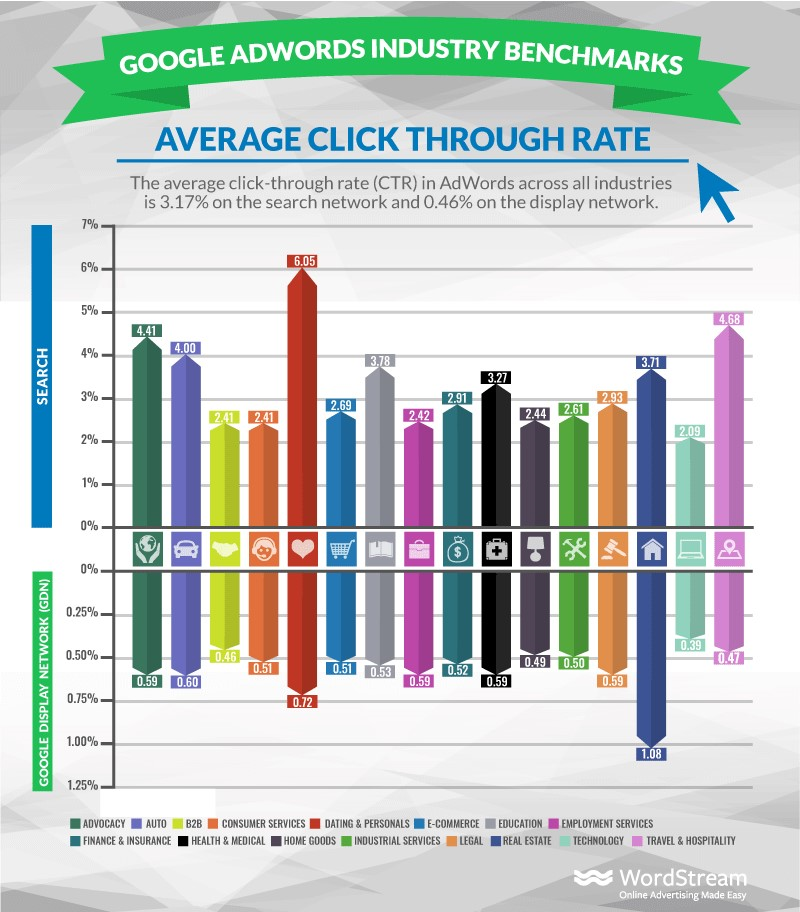
- Click-Through Rate (CTR): This metric shows the percentage of users who click on an ad after seeing it. A higher CTR often indicates that the ad is both compelling and relevant.
- Conversion Rate: This measures the percentage of visitors who take a desired action — like completing a purchase or signing up for a newsletter. A higher conversion rate suggests effective ad targeting and messaging.
- Cost Per Acquisition (CPA): This metric calculates the average cost of acquiring a customer through the ad campaign. It’s derived by dividing total ad spend by the number of conversions.
- Return on Ad Spend (ROAS): This compares the revenue generated from ads to the amount spent on them. A ROAS of 400% means every dollar spent on advertising yields four dollars in revenue.
Calculating the Return on Investment for Ad Spend
To calculate ROI for Google Ads, follow this formula:
1. **Determine Total Revenue Generated**: Calculate the total revenue attributed to the ad campaign over a specific period.
2. **Calculate Total Ad Spend**: Sum all costs related to the campaign, including clicks, impressions, and any additional fees.
3. **Apply the ROI Formula**:
ROI = (Total Revenue – Total Ad Spend) / Total Ad Spend x 100
For example, if a campaign generates $10,000 in revenue and costs $2,000, the ROI would be:
ROI = ($10,000 – $2,000) / $2,000 x 100 = 400%.
Recent data from 2024 shows businesses see an average ROAS of about 800% — effective campaigns can yield significant returns.
Case Studies of Successful Google Ads Campaigns
Several businesses have successfully leveraged Google Ads to boost their ROI:
– **A Local Retailer**: A small home decor business increased its revenue by 150% within three months of launching a targeted Google Ads campaign focused on seasonal promotions.
– **An E-Commerce Brand**: A fashion retailer achieved a 500% ROAS by using shopping ads in combination with remarketing strategies — reaching previous site visitors effectively.
– **A SaaS Company**: By targeting specific industry keywords, a software company lowered its CPA by 30%, which resulted in a higher conversion rate and increased customer lifetime value.
Nuance / Expert Layer
Common misconceptions about Google Ads ROI include the notion that higher spending directly leads to better results. In reality, effective targeting, ad quality, and ongoing optimization are crucial components. Furthermore, many campaigns overlook long-term value and focus solely on immediate conversions — a holistic view of customer journeys, including repeat purchases and brand loyalty, can lead to a more accurate assessment of ad effectiveness.
Practical Application
To maximize the ROI of Google Ads, businesses should:
1. **Regularly Monitor KPIs**: Use analytics tools to track CTR, conversion rates, and CPA consistently.
2. **A/B Test Ad Variations**: Experiment with different ad copies and visuals to see what resonates best with the target audience (this is often overlooked).
3. **Optimize Campaigns Based on Data**: Adjust bids and targeting strategies based on performance insights to improve overall ad spend efficiency.
By implementing these strategies, advertisers can better understand how much Google Ads cost and make sure their investments yield profitable returns.
Frequently Asked Questions
What is the average cost per click for Google Ads?
The average cost per click (CPC) for Google Ads typically ranges from $1 to $2 on the search network. However, competitive industries may see higher CPCs, sometimes exceeding $50.
How can I calculate my Google Ads budget?
To calculate your Google Ads budget, consider your daily spend limit, target CPC, and desired number of clicks. Divide your overall budget by your CPC to estimate the number of clicks you can afford.
What factors influence the cost of Google Ads?
Factors influencing the cost of Google Ads include keyword competition, ad quality score, and geographical targeting. Higher competition and lower quality scores typically lead to increased costs.
Is Google Ads worth the cost?
Google Ads can be worth the cost if managed effectively, providing targeted reach and measurable results. Businesses often find it beneficial for driving traffic and increasing conversions when campaigns are optimized.
What are the different pricing models for Google Ads?
Google Ads primarily operates on a pay-per-click (PPC) model, but also offers cost-per-thousand impressions (CPM) and cost-per-acquisition (CPA) options. Each model serves different advertising goals and strategies.
How long does it take to see results from Google Ads?
Results from Google Ads can often be seen within a few days to weeks, depending on campaign settings and budget. However, optimizing for maximum effectiveness may require ongoing adjustments over time.
What is a good starting budget for Google Ads?
A good starting budget for Google Ads typically ranges from $500 to $1,000 per month. This allows for sufficient data collection and optimization while testing various keywords and ad strategies.
Final Thoughts on how much does google ads cost
Understanding the complexities of Google Ads pricing is crucial for any business looking to leverage digital marketing effectively. The costs can vary significantly based on industry competition, targeting options, and campaign objectives, making it imperative to approach budgeting with a strategic mindset.
To maximize your investment, conduct thorough keyword research and competitor analysis to determine realistic cost-per-click estimates, enabling you to allocate your budget more effectively and achieve better returns.
Ready to maximize your advertising budget? Connect with a google ads expert today and start seeing real results for your business!
Mastering Google Ads costs is essential for optimizing your marketing strategy and driving tangible business growth in an increasingly competitive digital landscape.